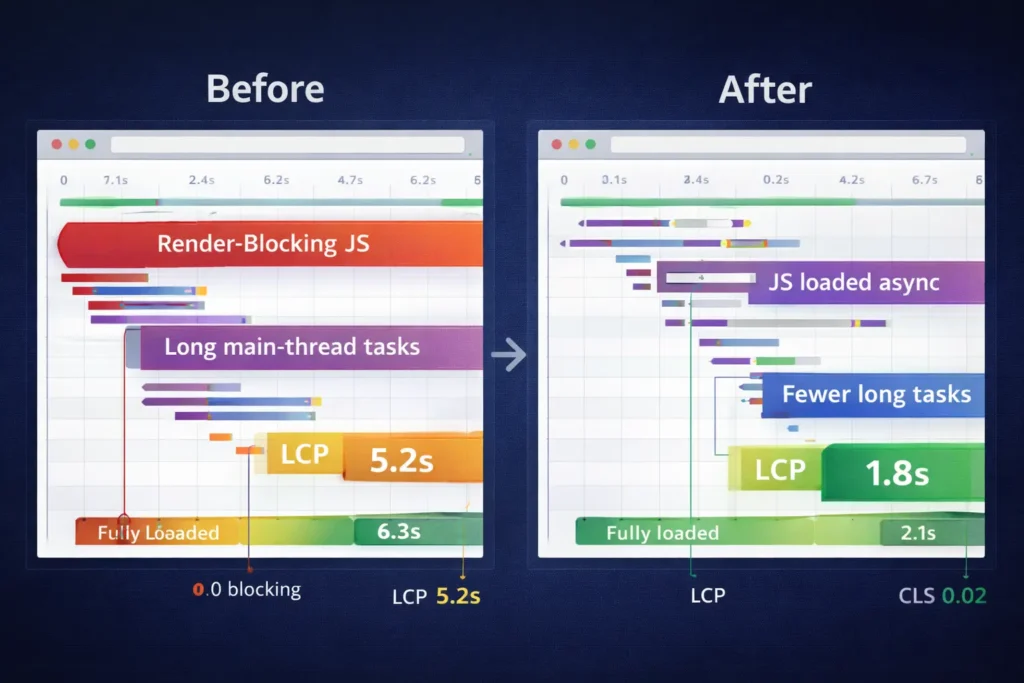
If you searched why my site is slow, you’re not alone. Most speed issues come down to five areas: front-end weight, script execution, server time, database queries, and third-party services. In this guide, you’ll learn why these problems happen, how to fix them with simple checks, and which option is best for your situation so you stop bleeding conversions and improve Core Web Vitals.
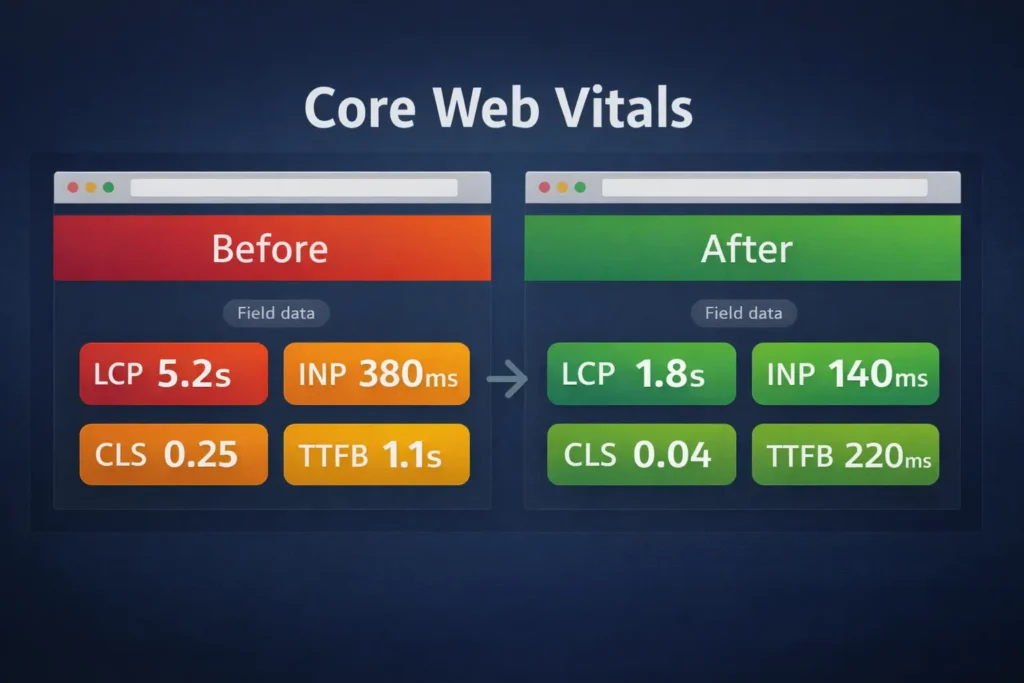
Your site is usually slow because of oversized media, render-blocking JavaScript and CSS, server bottlenecks, and chatty third-party tags. Speed it up by compressing images and video, deferring non-critical scripts, enabling full-page caching with a CDN, and right-sizing your hosting plan.
Quick Answer Table: What’s Slowing You Down (and the One-Hour Fix)
| Symptom you see | Likely root cause | One-hour fix you can do today |
| Pages feel heavy; slow on mobile | Uncompressed images/video; no lazy-load | Convert images to WebP/AVIF, set loading=”lazy”, set width/height |
| First paint takes forever | Render-blocking CSS/JS; large fonts | Inline critical CSS, defer non-critical JS, and preload key fonts |
| “Waiting for server” long | Slow TTFB; weak hosting; PHP overhead | Turn on full-page caching, enable OPcache, and add CDN |
| Smooth on home, slow on blog/product | Query-heavy templates; bloated builder | Cache fragments, limit related posts queries, prune plugins |
| Interactivity janky | Too much client JS; chat widgets | Delay third-party tags, use server-side tracking, trim widgets |
The Short WHY: What actually makes websites slow
- Front-end weight: Unoptimized images and bloated CSS/JS force big downloads, especially painful on 3G/4G and low-end phones.
- Render-blocking code: CSS and synchronous JS block the browser from painting anything until they’re parsed.
- Server and database time: Underpowered hosting or inefficient queries increase TTFB and stall every page view.
- Third-party scripts: Ads, analytics, chat, heatmaps, A/B tools, and social embeds add network trips and main-thread work.
- Inefficient themes/builders: Visual builders and multipurpose themes ship features you don’t use, loading megabytes by default.
Want help implementing fixes? Start with a lightweight audit and a scoped sprint via conversion-focused web design.
The How: Step-by-step speed plan you can actually finish this week
1. Measure first so you don’t guess
- Run PageSpeed Insights and check field data (CrUX) and lab data (Lighthouse). Pay attention to LCP, INP, CLS, and TTFB.
- Open your network waterfall. Sort by size and blocking to spot heavy files and render blockers.
- In your browser’s Performance panel, watch main-thread time for long tasks over 50 ms.
Add two benchmarks to track: first meaningful paint time and total JS execution. Then fix from the biggest win to the smallest.
For official guidance on metrics and thresholds, see Google’s Core Web Vitals docs and PageSpeed Insights guides from web.dev. (Helpfully blends with RankMath’s recommendations for external references.)
2. Win fast with media trimming
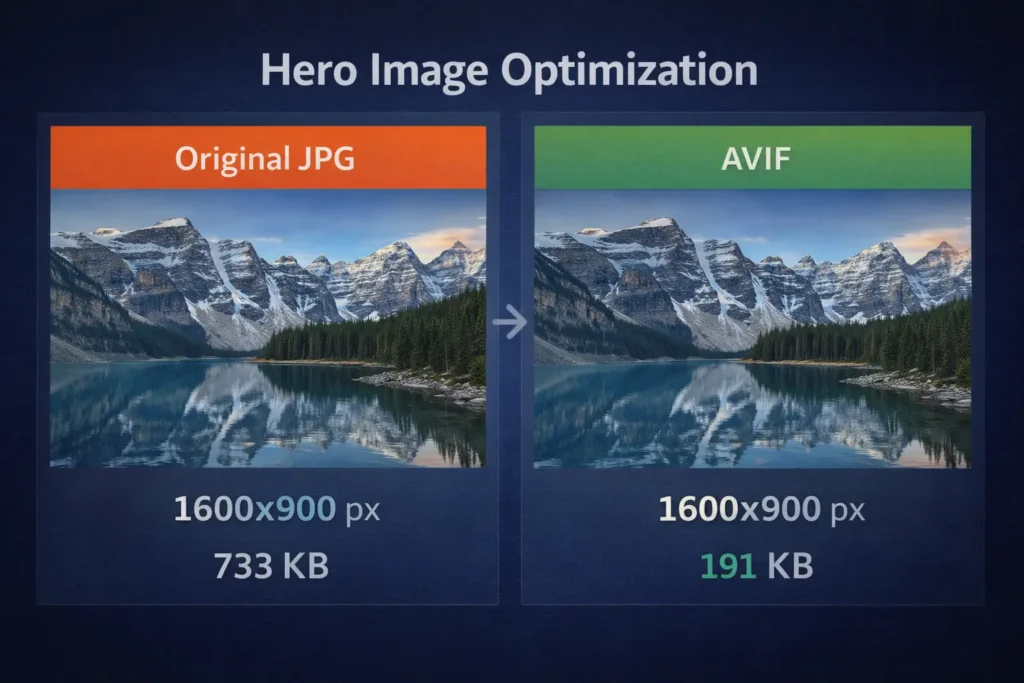
- Images: Export at the right dimensions, use WebP/AVIF, enable lazy-loading (loading=”lazy”), and fetchpriority for the hero.
- Video: Host long clips on a streaming platform, not your server. Poster images + “click-to-play” beat auto-play.
- Icons/illustrations: Prefer SVG and a subsetted icon set instead of a 300-icon font file.
Practical tip: If one hero image is 1.2 MB and you get 10k visits/month, you’re pushing 12 GB in just that asset. Converting it to AVIF at ~120 KB can reclaim ~90% bandwidth and seconds for mobile users.
3. Stop blocking the render
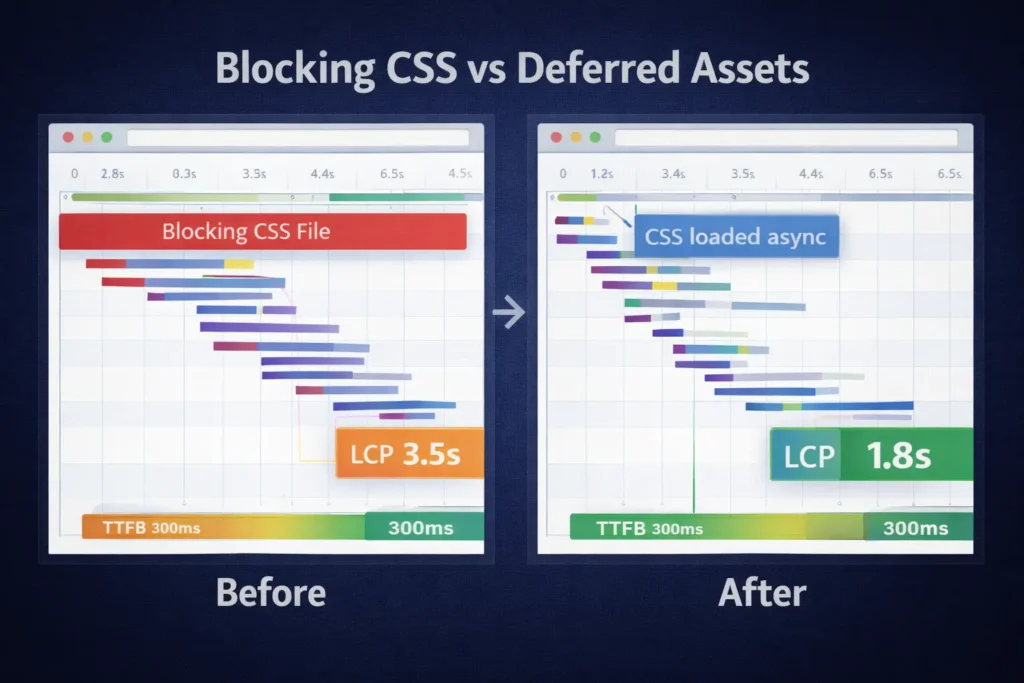
- Inline critical CSS (above-the-fold styles), defer non-critical CSS with media=”print” then swap, or use modern tooling that extracts critical paths automatically.
- Defer or delay JS not needed for first paint. If a script doesn’t need to run before user interaction, load it async after the main content paints.
- Preload the main font file and your LCP resource (hero image) to cut discovery time.
4. Cut JavaScript work in half
- Audit your plugins/modules. Remove what duplicates functionality.
- Replace heavy carousels and feature-rich components with CSS scroll-snap or a light slider.
- Break big bundles; code-split by route. Ship modern syntax to modern browsers.
- For tracking, use server-side or tag via a container with consent-based, delayed loading.
Rule of thumb: Every 100 KB gzipped JS can add ~100–300 ms of parse/execute on low-end mobiles. Ship less.
5. Fix server and database time (TTFB)
- Turn on full-page caching and set a stale-while-revalidate window so users never wait for a cold build.
- Put a CDN in front for edge caching, image optimization, and Brotli compression.
- Enable OPcache for PHP, upgrade to PHP 8.2+, and ensure HTTP/2 or HTTP/3 is active.
- Index heavy tables, cache expensive queries, and paginate product/blog listings.
If your TTFB is still >600 ms after caching, your plan or stack likely isn’t right for your traffic.
When speed is tied to revenue, consider a guided sprint with speed optimization services.
6. Trim third-party drag
- Load chat, widgets, and social embeds only when the user clicks or after idle.
- Prefer server-side analytics or a privacy-first, lightweight tracker.
- Remove redundant pixels. Merge A/B tools when possible.
- Statistically render social cards instead of JS-powered embeds.
Which Option Is Best? Match fixes to your scenario
| Situation | Best option | Why it’s best |
| Low traffic, small site | Media + render-blocking cleanup | Biggest win per hour; minimal risk |
| Scaling store/blog | CDN + full-page cache + DB indexing | Reduces server load and TTFB across the board |
| Heavily scripted UI | JS diet + code-split + delay tags | Cuts long tasks, improves INP quickly |
| International audience | Multi-CDN or global POP | Brings content closer, lowers latency |
| Legacy theme/builder | Redesign on lean stack | When bloat is architectural, rebuilding beats patching |
See real outcomes in our project gallery.
Why this matters to SEO, conversions, and AEO
- SEO: Page speed and Core Web Vitals influence rankings and crawl efficiency. Faster sites get crawled deeper and more often.
- Conversions: Every 100 ms delay can dent conversion rate. Faster pages lift add-to-cart and lead form completion.
- AEO (Answer Engine Optimization): Clear, scannable answers and lightweight pages earn featured snippets, AI overviews, and better voice responses. The structure you see here is built to answer quickly and completely.
If you’ve wondered why my site is slow, remember that performance is a product decision. Speed improves UX, acquisition, and revenue all at once.
One-Day Checklist: How to go from red to green
- Compress top 20 images to WebP/AVIF and enforce max dimensions.
- Inline critical CSS; defer the rest; preload main font and hero.
- Defer or delay all non-essential JS, especially third-party tags.
- Turn on full-page caching + CDN with Brotli and image optimization.
- Remove 3 redundant plugins and one heavy widget.
- Re-run PageSpeed Insights and compare LCP/INP/CLS plus TTFB.
- Document what moved the needle; keep only the winners.
Need a hand scoping what’s worth doing first? Book a quick call via speed optimization services.
Troubleshooting Patterns (so you don’t chase ghosts)
- Great lab score, bad field data: Your real users are on older Android devices or poor networks. Fix by shipping less JS and smaller images, not by gaming Lighthouse.
- Fast home, slow product pages: Template queries and third-party reviews/widgets. Cache fragments and lazy-render components below the fold.
- CLS spikes only on live: Ads or dynamic banners shifting layout. Reserve space with aspect ratios and use CSS containment.
- Good TTFB, poor LCP: The LCP element is discovered too late. Preload it and reduce CSS that holds it hostage.
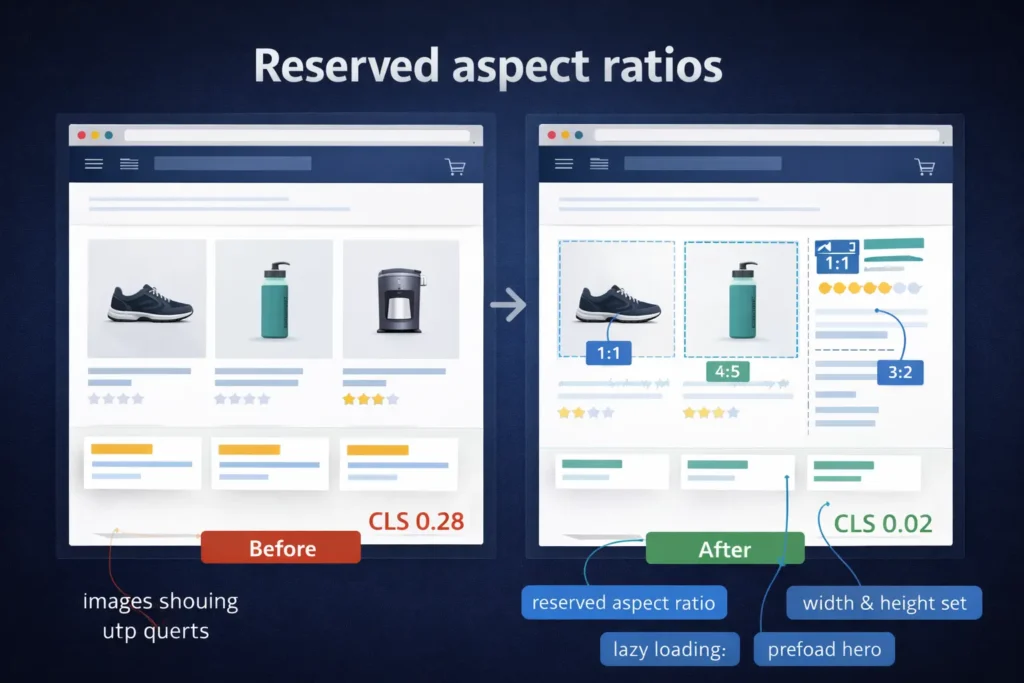
Practical examples (from real projects)
- Photography portfolio: Swapped 3.6 MB hero JPG for a 180 KB AVIF, deferred a gallery script, and used native lazy-load. LCP dropped from 5.2 s to 1.8 s on 4G.
- Content site on shared hosting: Enabled page cache + CDN, trimmed 7 tag manager pixels, replaced a carousel with CSS. TTFB from 1.1 s to 220 ms; INP improved 40%.
- WooCommerce store: Implemented object cache, cached fragments for cart and mini-cart, and indexed order tables. Reduced query time by 60%; checkout abandonment decreased 12%.
Explore complementing trust signals and UX improvements in our guide: website trust issues guide. Explore complementing trust signals and UX improvements in our guide: website trust issues guide.
External references you can use for deeper checks
Use PageSpeed Insights to check field data and web.dev for Core Web Vitals thresholds, audit patterns, and best practices. These references give thresholds and remediation ideas you can map directly to your site’s diagnostics.
- Google PageSpeed Insights: run lab + field metrics, opportunities, and diagnostics.
- web.dev Core Web Vitals: definitions, targets, and engineering playbooks.
These two are ideal external links for RankMath’s topical authority and E-E-A-T.
Hosting and plan fit: Are you under-provisioned?
| Monthly visits | Typical plan tier | What to verify |
| <25k | Quality shared or small VPS | Caching available, HTTP/2+, brotli, SSD, OPcache |
| 25k–250k | Managed VPS / mid-managed WordPress | Redis object cache, CDN integration, PHP 8.2+, autoscaling |
| 250k–1M+ | High-availability cluster | Edge caching, image/CDN at POP, read replicas, WAF, observability |
If you keep asking why my site is slow and TTFB spikes under load, it’s time to resize or redesign your stack.
Internal links you’ll want next
- Strategy and implementation help: speed optimization services
- See outcomes we benchmarked: case studies with numbers
- UX + CRO partnership: conversion-focused web design
Related reading to close your leaky funnel:
- How to turn visits into revenue: website traffic but no sales fixes
- Content that actually acquires customers: blog, not bringing customers playbook
FAQs
How to fix a website being slow?
Tackle media, render-blocking, server time, and third-party scripts in that order. Start by converting images to WebP/AVIF and lazy-loading them. Inline critical CSS and defer the rest, preload your hero and font. Turn on full-page caching behind a CDN to shrink TTFB. Trim or delay third-party tags, and remove duplicate plugins. Re-test and iterate on the top wins.
How do I make my site faster?
Ship less, block less, and serve from closer to the user. Reduce JavaScript, split bundles by route, and delay non-critical widgets. Use a CDN with edge caching and Brotli, and ensure HTTP/2 or HTTP/3 is on. Clean your templates of heavy loops, cache fragments, and index hot database columns. The fastest sites combine a lean front end with predictable server responses.
How do I fix slow browser speed?
Reduce main-thread work and network chatter. Too much JavaScript and too many third-party requests overwhelm the browser, especially on older phones. Defer analytics, chat, and social embeds until interaction. Replace heavy sliders with CSS. Avoid large web fonts and preload only what you need. Measure INP and long tasks; your goal is fewer than 200 ms for most interactions.
How do I check what is slowing down my website?
Use PageSpeed Insights and your browser devtools to pinpoint bottlenecks. Inspect the network waterfall for big downloads and blocking CSS/JS. Check Performance for long tasks and main-thread spikes. Look at TTFB to judge server time. Compare lab data to field data; if the field is worse, your audience likely has slower devices/networks. Fix by priority and retest after each change.
Ready to move faster?
If you’re asking why my site is slow, you’re already close to the win. Start with the one-day checklist, then harden your stack with caching and a CDN, and finally diet your JavaScript. When you need hands-on help, our conversion-focused web design team can scope, implement, and validate improvements in days, not months.