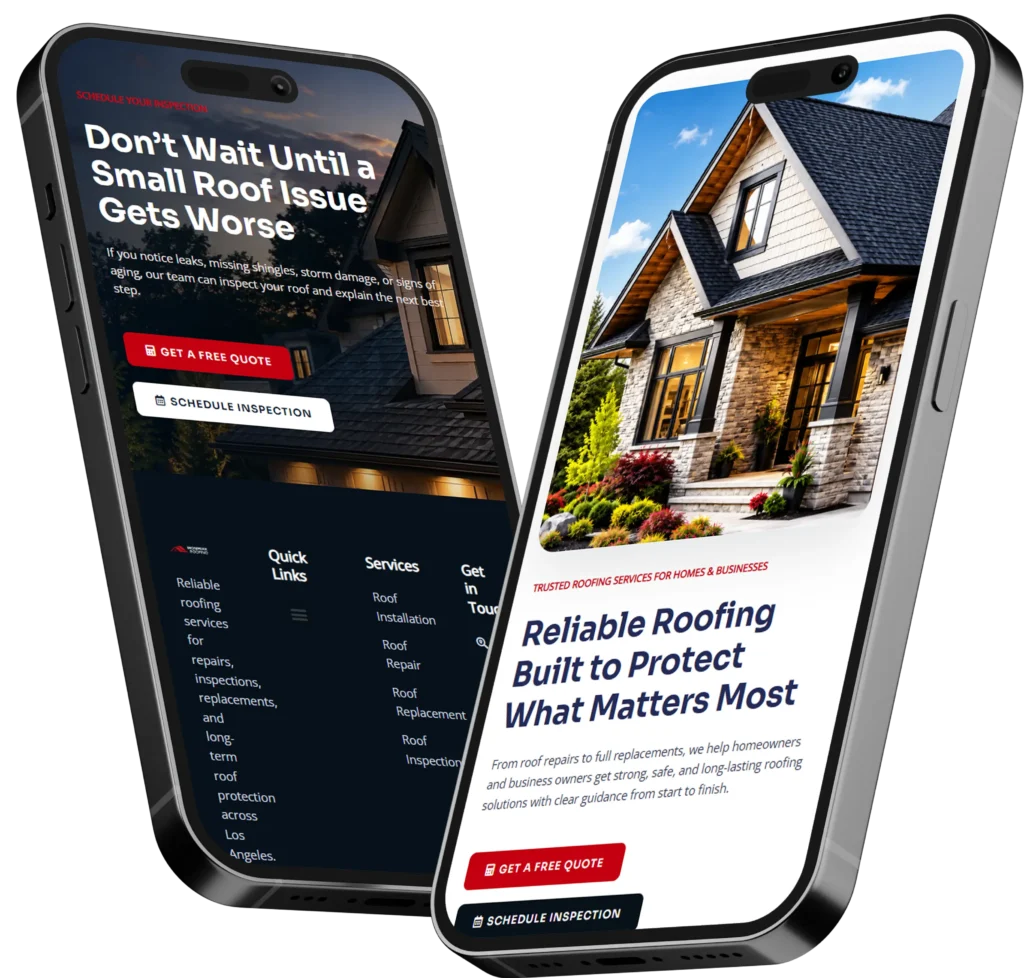
A remote WordPress designer for small business helps owners build a professional website without needing an in-house team or expensive local agency. The best choice is someone who understands design, SEO, trust, mobile experience, and how to turn visitors into leads.
If your current website looks outdated, loads slowly, or does not bring calls, bookings, or quote requests, hiring the right designer can make a big difference. A strong WordPress website should explain what you do, build confidence quickly, and guide visitors toward taking action.
In this guide, we’ll explain what a remote WordPress designer does, why small businesses hire one, how to choose the right option, and which website design approach is best for your goals.
Ready to improve your website? Start with conversion-focused web design built for small business growth.
What Does a Remote WordPress Designer Do?
A remote WordPress designer creates, redesigns, or improves websites using WordPress while working with you online. Instead of meeting in person, the process usually happens through email, calls, shared documents, screen recordings, and project tools.
This can include planning your website pages, improving the layout, updating visuals, building landing pages, setting up contact forms, improving mobile design, and making sure your site is easy to use.
A good designer does more than make the site look nice. They help visitors understand your offer, trust your business, and know exactly what to do next.
Basic Definition and Purpose
A remote WordPress designer is a professional who designs and builds WordPress websites from anywhere. For small business owners, this is useful because you can hire based on skill and fit instead of only choosing someone nearby.
The main purpose is to create a website that supports your business goals. That may mean more phone calls for a local service company, more appointment bookings for a clinic, more quote requests for a contractor, or more product inquiries for a small eCommerce brand.
A strong website should answer three questions fast:
✅ What does this business offer?
✅ Why should I trust them?
✅ What should I do next?
If your website does not answer those questions clearly, visitors may leave even if your service is excellent.
How It Differs From a DIY Website Builder
A DIY website builder can work for very simple needs, but many small businesses outgrow it quickly. The problem is not only design. It is messaging, page structure, speed, mobile experience, tracking, SEO basics, and conversion flow.
A remote WordPress designer can build around your actual business model. For example, a dentist needs service pages, booking buttons, reviews, and location trust signals. A contractor needs project photos, quote forms, service area content, and before-and-after proof. A consultant needs authority, case studies, clear packages, and lead capture.
WordPress also gives more flexibility for future growth. You can add blogs, landing pages, SEO tools, booking integrations, forms, galleries, and conversion tracking as your business grows.
For wider SEO basics, the Google Search Central SEO Starter Guide explains that SEO helps search engines understand your content and helps users decide whether to visit your site.
Why Small Businesses Hire Remote WordPress Designers
Small business owners usually hire a remote designer because they need a better website without the cost or delay of a large agency. The right designer can improve how your business appears online and make your site easier for customers to use.
Better Website Quality Without Local Limits
When you only search locally, your options may be limited. Remote hiring lets you choose based on portfolio, process, industry experience, communication, and results.
This is helpful if you need a designer who understands lead generation, not just colors and layout. A clean website matters, but a clear offer, easy navigation, strong calls to action, and trust-building content matter just as much.
For example, a local cleaning company might not need a huge website. It may need a strong homepage, service pages, testimonials, service areas, and a booking form that works well on mobile. A remote designer can build that without unnecessary complexity.
More Focus on Leads, Calls, and Bookings
A small business website should not act like an online brochure only. It should help people take the next step.
That means your designer should think about calls, forms, booking links, and quote requests during the planning stage. The website should make it easy for visitors to contact you from every important page.
Google Business Profile can also help service businesses connect with customers through Search and Maps, show services, build trust through reviews, and support actions like bookings or quote requests. Your website and Google profile should work together, not separately.
Want a website built around real business goals? Explore website design & development services for redesigns, landing pages, and conversion-focused improvements.
When Should You Hire a Remote WordPress Designer?
You should hire one when your current website is hurting trust, slowing down leads, or making your business look smaller than it really is.
Many owners wait until their website is completely broken before getting help. But the better time is when your site is still active but no longer supports your goals.
Signs Your Website Needs Help
Your website may need a redesign if visitors leave quickly, your pages feel cluttered, or people keep asking questions that should already be answered online.
You should also pay attention to practical issues. If your contact form fails, your site is not mobile-friendly, or your service pages are thin, your website may be costing you opportunities.
Here are common warning signs:
✅ Your homepage does not clearly explain what you do
✅ Your site looks outdated compared to competitors
✅ You get traffic but few calls or bookings
✅ Your pages load slowly on mobile
✅ You do not have strong service pages
✅ Your site has no clear call to action
✅ Your content does not match what customers search for
Even small changes can help. Moving a call button higher, rewriting your headline, adding proof, or simplifying a form can improve how people respond.
Website Redesign vs. New Website
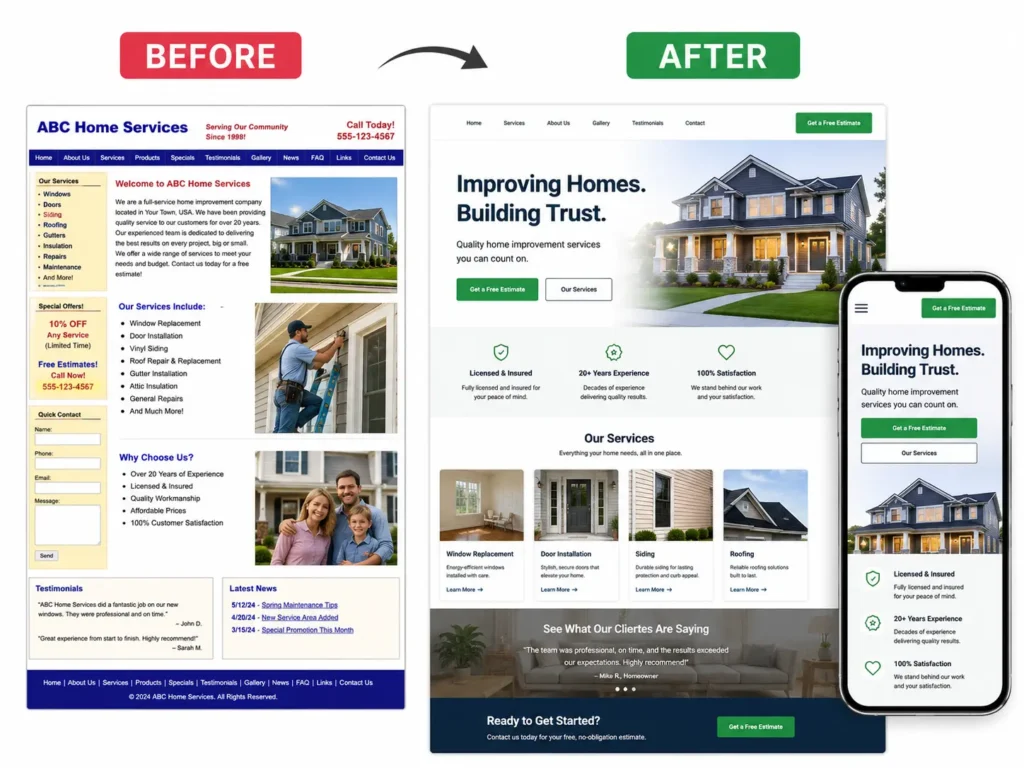
Not every business needs to start over. Sometimes a redesign is enough. Other times, rebuilding from scratch is better because the current website has too many technical or structural issues.
If your content is good but the layout feels old, a redesign may work. If your site is slow, hard to edit, poorly built, or missing important pages, a fresh WordPress build may be the smarter option.
A remote designer should be able to explain which option applies and why.
Which Website Design Option Is Best?
The best option depends on your budget, timeline, goals, and how much strategy you need. A cheap template might be fine for a short-term landing page, but a growing business usually needs something more intentional.
| Website Option | Best For | Why It Works | Main Limitation |
|---|---|---|---|
| DIY Template | Very new businesses testing an idea | Low cost and fast setup | Often weak on trust, SEO, and conversion |
| Freelance Designer | Small redesigns or simple sites | Flexible and personal process | Skill level can vary |
| Remote WordPress Designer | Service businesses that need leads | Good balance of design, SEO, and conversion | Requires clear communication |
| Large Agency | Bigger brands with complex needs | Full team and deeper strategy | Higher cost and longer timeline |
For most small businesses, a remote WordPress designer is the best middle ground. You get professional help without paying for a large agency structure. You also get more flexibility than a basic template.
Which Option Applies to You?
Choose a DIY template if you only need a temporary web presence and do not rely on your website for leads.
Choose a freelancer if you need a small update, such as fixing page layout, improving forms, or refreshing a landing page.
Choose a remote WordPress designer if your website needs to support SEO, calls, bookings, trust, and ongoing business growth.
Choose an agency if you need branding, copywriting, ads, SEO, development, analytics, and long-term campaign support under one team.
Not sure what level of work your site needs? Review portfolio highlights to compare design style, structure, and project quality.
How to Choose the Right Remote WordPress Designer
Choosing the right designer is not only about liking their portfolio. You need to understand how they think, how they communicate, and how they connect design decisions to business goals.
Check Their Website Design Process
A reliable designer should have a clear process. They should ask about your goals, audience, services, competitors, website problems, and desired actions.
If someone starts designing without asking questions, that can be a warning sign. A good website starts with strategy, not just visuals.
The process may include discovery, sitemap planning, wireframes, design, WordPress development, mobile testing, SEO setup, launch, and post-launch support.
A practical process keeps the project organized and prevents wasted revisions.
Review Their Past Work
Look at previous websites and ask yourself if the designs feel clear, modern, and easy to navigate. Do the pages guide visitors toward action? Do the websites load well on mobile? Is the messaging easy to understand?
Good design should not make people think too hard. Visitors should instantly know where they are, what the business offers, and how to move forward.
You can also read how to hire a remote web designer if you want a deeper checklist before making a decision.
Ask About SEO and Page Structure
A designer does not need to be a full SEO agency, but they should understand basic SEO structure. This includes clean URLs, page titles, headings, image alt text, internal links, service pages, and mobile usability.
For RankMath, your website pages should have focused keywords, helpful meta descriptions, readable headings, and internal links to important pages. But SEO should still sound natural. Keyword stuffing can make your content feel forced and less helpful.
For small businesses, the most important SEO pages are usually your homepage, core service pages, location pages if applicable, blog posts, and landing pages.
What Should Be Included in a Small Business WordPress Website?
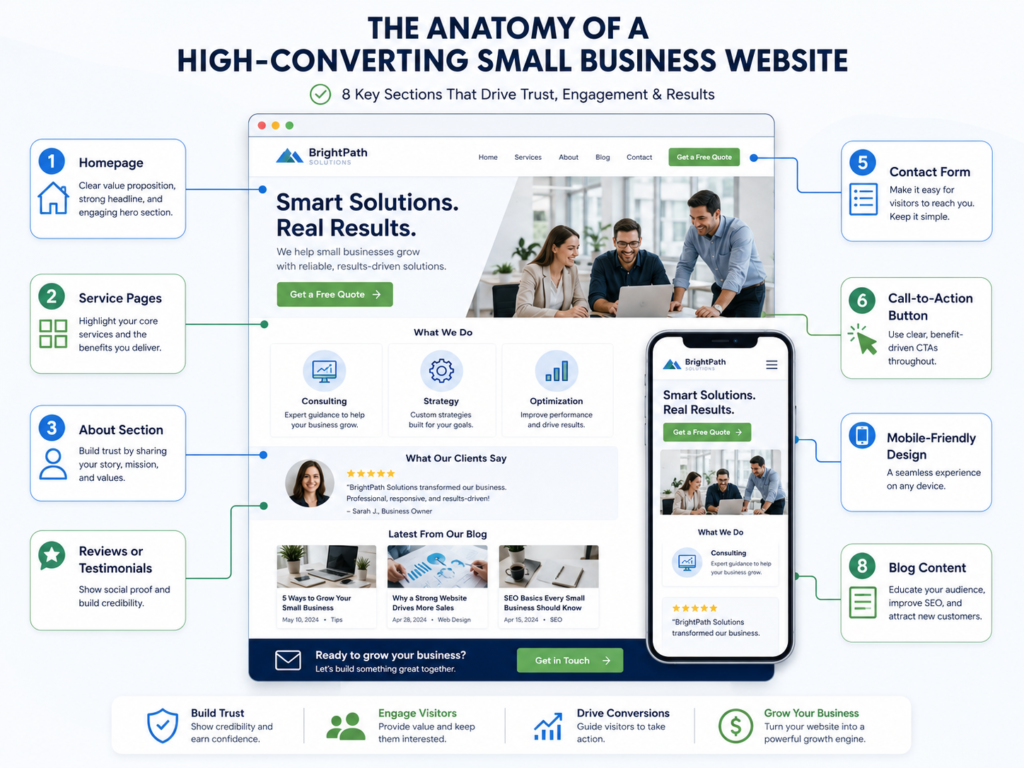
A small business website should include the pages and sections needed to build trust and encourage action. It should not be bloated, but it should not feel incomplete either.
| Website Element | Why It Matters | Practical Tip |
|---|---|---|
| Clear Homepage | Explains your value quickly | Use a direct headline and CTA above the fold |
| Service Pages | Helps visitors and search engines understand each offer | Create one page per main service |
| About Section | Builds trust and personality | Add your story, values, and real photos if possible |
| Testimonials | Reduces doubt | Place reviews near CTAs |
| Contact or Booking Form | Turns visitors into leads | Keep forms short and easy |
| Mobile Design | Most visitors may check your site on their phone | Test buttons, menus, and forms on mobile |
| Blog Content | Supports SEO and education | Answer real customer questions |
| Analytics and Tracking | Shows what is working | Track calls, forms, and bookings |
A website should feel simple, but the planning behind it should be thoughtful.
Practical Example
Imagine a local HVAC company with an old five-page website. The homepage says “Welcome to our website,” the service page lists everything in one paragraph, and the contact button is only at the bottom.
A better version would have a clear headline like “Fast HVAC Repair and Installation in Austin,” separate service pages for AC repair, furnace repair, maintenance, and installation, visible phone buttons, customer reviews, financing details, and a short quote form.
That is not just prettier. It is easier for customers to understand and easier for search engines to categorize.
For more small business context, read website designer for US small businesses.
How Remote Website Projects Usually Work
Remote projects can feel smooth when expectations are clear. You do not need to sit beside the designer. You need organized communication and good project checkpoints.
Step 1: Discovery and Website Goals
This is where you explain what your business does, who you serve, what pages you need, and what action you want visitors to take.
The designer may ask for your current website, brand assets, service details, competitors, examples you like, and customer pain points.
Step 2: Sitemap and Content Planning
Before design begins, the website structure should be mapped out. This helps avoid missing important pages.
For a service business, the sitemap might include homepage, about, services, individual service pages, service areas, gallery, blog, and contact.
Step 3: Design and Feedback
The designer creates page layouts and shares them for review. Your feedback should focus on clarity, accuracy, trust, and business goals.
Instead of saying “make it pop,” explain what feels unclear or what customer concern needs to be addressed.
Step 4: WordPress Build and Testing
Once the design is approved, the site is built in WordPress. This includes mobile testing, form testing, link checks, basic SEO settings, image optimization, and launch preparation.
Step 5: Launch and Support
After launch, the designer should check that forms work, pages are indexed properly, redirects are handled if needed, and the site is easy for you to update.
Some businesses also choose ongoing maintenance for updates, security checks, backups, and small improvements.
If you prefer flexible help without hiring full-time, see this guide on an outsourced web designer for small business.
Why Trust Matters in Website Design
Small business websites need trust fast. Visitors often compare several companies before calling, booking, or requesting a quote.
Trust can come from reviews, real photos, clear pricing guidance, service details, certifications, guarantees, case studies, before-and-after work, and easy contact options.
A polished design helps, but proof is what makes people feel safe taking action.
Trust Signals That Help Visitors Decide
Use trust signals throughout your website, not only on one testimonial page. Place reviews near booking buttons. Add project photos near service descriptions. Show logos, badges, or certifications where relevant.
If you offer emergency service, say it clearly. If you serve specific locations, list them. If your team is licensed, insured, family-owned, or locally experienced, explain that in plain language.
Small details can reduce hesitation.
How Landing Pages Help Small Businesses
A landing page is a focused page built around one offer or campaign. It can be used for Google Ads, Facebook Ads, email campaigns, seasonal promotions, or local service campaigns.
Unlike a general homepage, a landing page should have one main goal. That goal may be booking a consultation, requesting a quote, downloading a guide, or calling your team.
When a Landing Page Is the Best Option
A landing page is best when you are promoting one specific service, offer, or audience.
For example, a med spa may create a landing page for “Botox appointments in Phoenix.” A roofing company may create one for “storm damage roof inspections.” A coach may create one for “free strategy call.”
A focused landing page can remove distractions and make the next step obvious.
Common Mistakes to Avoid
Many small business websites fail because they try to say too much without guiding the visitor. Others look nice but do not support conversions.
Avoid these common problems:
✅ Weak headline with no clear offer
✅ Too many menu items
✅ No phone number on mobile
✅ Long forms asking for too much information
✅ Stock photos that feel generic
✅ No proof or reviews
✅ Service pages that are too short
✅ Blog posts with no internal links
✅ No tracking for calls or form submissions
The goal is not to make a complicated website. The goal is to make the customer journey easier.
Final Takeaway: remote WordPress designer for small business
Hiring the right designer can help your website look better, load faster, explain your services clearly, and turn more visitors into leads. For small businesses, the best website is not always the biggest one. It is the one that builds trust and makes action easy.
A remote WordPress designer for small business is often the best choice when you want professional design, WordPress flexibility, and a process focused on leads, calls, bookings, and SEO. Start with clear goals, review past work, ask about strategy, and choose someone who understands both design and business growth.
Frequently Asked Questions
1. How much does it cost to hire a remote WordPress designer for a small business?
The cost depends on the project size, page count, design quality, and support needed. A simple website refresh may cost less than a full redesign with service pages, landing pages, SEO setup, forms, and migration. Small business owners should avoid choosing based on price alone. A cheap website can become expensive if it does not build trust, rank well, or generate leads. Ask what is included, how revisions work, and whether launch support is provided.
2. Is hiring a remote web designer trustworthy for a business website redesign?
Yes, hiring remotely can be trustworthy when the designer has a clear process, portfolio, communication style, and project agreement. Many professional website projects are handled fully online. The key is to review past work, confirm deliverables, ask how feedback is handled, and make sure you know what happens before and after launch. A good remote designer should explain timelines, content needs, payment terms, access requirements, and support options before work begins.
3. Can a WordPress designer help my website get more calls and bookings?
A good WordPress designer can improve the structure, messaging, and calls to action that encourage more leads. Design alone does not guarantee bookings, but it can remove friction. Clear headlines, visible phone buttons, short forms, booking links, trust signals, mobile-friendly pages, and strong service content can help visitors take action. For best results, connect your website with your Google Business Profile, analytics, and follow-up process so you can track what is working.
4. Should I hire a remote designer for landing pages or a full website redesign?
Choose a landing page if you need one focused campaign, and choose a full redesign if your whole website feels outdated or unclear. A landing page works well for ads, seasonal offers, or one service. A full redesign is better when your homepage, service pages, mobile layout, navigation, and contact flow all need improvement. If your site gets traffic but not leads, a redesign may give you a stronger foundation before running more campaigns.