
A custom wordpress website is a tailored business site built around your goals, brand, content, and sales process instead of a generic template. It is best when you need stronger SEO structure, clearer user paths, flexible edits, and a website that can grow with your services.
For most small businesses, your website is not just a digital brochure. It is where people check if you look trustworthy, compare your services, read your content, and decide whether to contact you. A basic theme can get you online, but a tailored WordPress build helps your pages work harder for leads, search visibility, and long-term growth.
In this guide, we’ll explain what makes a tailored WordPress site different, why it matters, how it is built, and which option is best based on your business stage.
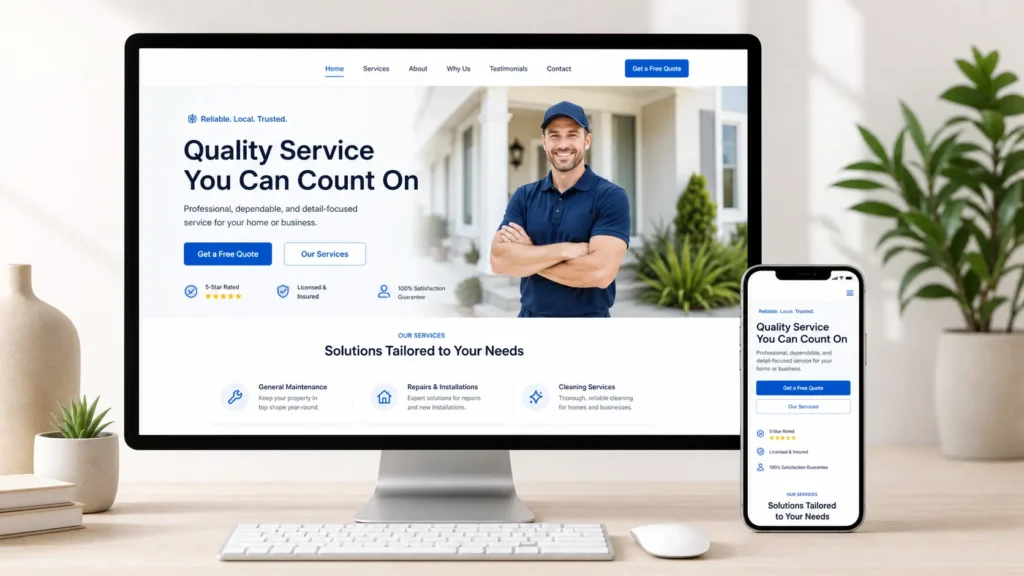
Need help planning a site that actually supports your goals? Start with growth-driven web design for a clearer path.
What Makes a Tailored WordPress Site Different
A tailored WordPress site is designed around your business instead of forcing your business into a pre-made layout. The structure, pages, buttons, forms, copy blocks, service sections, and mobile experience are created based on how your customers search and make decisions.
A template usually starts with design first. A tailored build starts with strategy first. That means the designer looks at what you sell, who you serve, what questions customers ask, and what action you want them to take.
This is important because a good site needs more than attractive colors. It needs a clean menu, fast-loading pages, clear calls to action, simple forms, useful service pages, and content that answers search intent. Google’s own SEO Starter Guide is a helpful external resource because it explains the value of clear, useful, well-organized pages for search.
WordPress is also flexible enough for both simple and advanced websites. The official WordPress block theme documentation explains how modern block themes can control areas like headers, footers, templates, and styles. That flexibility is one reason many businesses choose WordPress when they want control without being locked into one closed platform.
Why a Tailored WordPress Site Is Often Better
A tailored WordPress site is often better because it can connect design, SEO, speed, and conversion strategy in one build. Instead of adding random plugins and sections later, the site is planned from the start.
For example, a local service company may need location pages, service pages, trust badges, case studies, quote forms, and blog content. An online consultant may need booking links, lead magnets, testimonials, pricing sections, and comparison content. A portfolio-based business may need visual proof, project categories, and strong calls to action after every sample.
That is where customization becomes useful. It lets you create the exact layout your audience needs. It also prevents your site from feeling like hundreds of other websites using the same theme.
Here is the simplest way to think about it:
| Website Option | Best For | Why It Works | Possible Limit |
|---|---|---|---|
| DIY website builder | Very small starter sites | Fast setup and low starting cost | Limited SEO and design control |
| WordPress template | Budget-conscious businesses | Good for simple sites with standard needs | Can look generic without strategy |
| Tailored WordPress build | Growing service businesses | Better branding, SEO structure, and conversions | Needs proper planning and expert setup |
| Full redesign and migration | Existing sites that underperform | Fixes structure, speed, copy, and design issues | Requires more review before launch |
If your current site looks outdated, loads slowly, or does not bring leads, a tailored WordPress build is usually the better long-term choice. For a deeper SEO angle, read WordPress SEO for business before planning your page structure.
How the Best WordPress Sites Are Built
The best WordPress sites are not built page by page at random. They follow a process that connects your business goals to the final design.
The first step is discovery. This includes learning about your audience, services, competitors, current website issues, and the main action you want visitors to take. For a small business, that action might be booking a call, requesting a quote, visiting a location, viewing past work, or filling out a contact form.
The second step is structure. This is where your main pages are planned. Most service businesses need a homepage, about page, service pages, contact page, portfolio or sample work page, and blog content. If you offer several services, each important service should have its own page so Google and visitors can understand it clearly.
The third step is design. This includes layout, spacing, colors, typography, image placement, buttons, mobile views, and trust-building sections. Good design makes people feel confident, but it also guides them toward action.
The fourth step is development. This is where the design becomes a working WordPress site. A strong build keeps the site easy to update, avoids unnecessary plugin bloat, and makes sure pages work across desktop, tablet, and mobile.
The fifth step is SEO and launch preparation. This includes titles, meta descriptions, heading structure, internal links, image alt text, schema where needed, speed checks, redirects, and tracking setup.
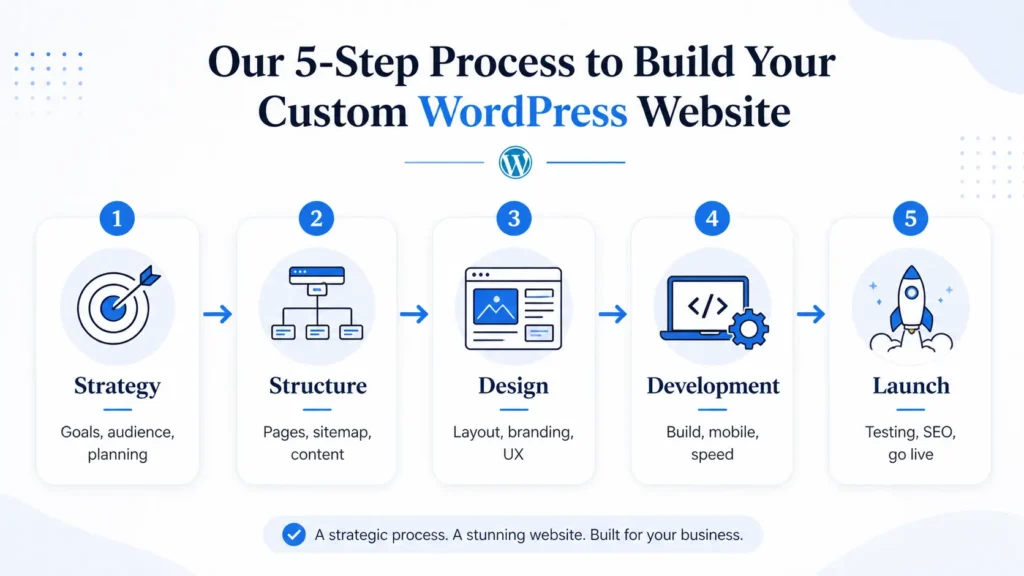
For hands-on help with the full process, explore website design & development services.
Which Website Option Is Best for Your Business
The best option depends on your budget, growth stage, and how important your website is to your sales process.
A DIY builder may be enough if you only need a basic online presence, such as a one-page site with your business name, phone number, and hours. It can work for testing an idea, but it may become limiting once you need SEO content, stronger branding, custom layouts, or better conversion tracking.
A WordPress template can be a good middle ground if your needs are simple. It gives you more control than many drag-and-drop builders, but you still need good copy, SEO setup, image optimization, and page planning. Without those, even a nice theme can fail to bring results.
A tailored WordPress build is best when your website needs to support business growth. This is the right option if you rely on leads, want to rank for service keywords, need unique page layouts, or want a site that feels built for your brand.
A redesign is best if you already have a site, but it is not converting. Common signs include low inquiries, confusing navigation, poor mobile layout, slow loading, outdated visuals, thin service pages, and no clear call to action.
If ranking is a major goal, you may also want to read how to rank a small business website so your site is built with search visibility in mind from the beginning.
What Pages Should a WordPress Site Include
A good WordPress site should include the pages your customers need before they feel ready to contact you. Many businesses make the mistake of having only a homepage and a contact page. That is rarely enough for SEO or trust.
Your homepage should explain who you help, what you offer, why you are different, and what visitors should do next. Your service pages should answer detailed questions about each offer. Your about page should build trust, not just tell your company history. Your portfolio page should show proof. Your blog should answer search-driven questions and support your main service pages.
Here is a practical page guide:
| Page or Feature | Why It Matters | Practical Tip |
|---|---|---|
| Homepage | Creates the first impression and directs visitors | Add a clear main offer above the fold |
| Service pages | Helps rank for specific services | Give each major service its own page |
| About page | Builds trust and human connection | Include who you help and why you do it |
| Sample work page | Shows proof before the visitor contacts you | Group projects by service or industry |
| Blog section | Answers questions and supports SEO | Link blogs back to related service pages |
| Contact page | Turns interest into action | Keep the form short and easy to complete |
You can view portfolio highlights for layout inspiration before deciding how to present your own work.
How a Tailored WordPress Site Helps SEO
A tailored WordPress site helps SEO because the page structure can be planned around search intent. Instead of placing every service on one long page, you can create focused pages that answer specific customer questions.
For example, a web designer could have separate pages for website redesign, WordPress development, maintenance, and SEO support. Each page can target a different keyword, include related FAQs, show relevant examples, and link to helpful blog content.
Internal linking also matters. When a blog post explains a common question, it should link to the service page that solves the problem. When a service page mentions a related topic, it can link to a deeper guide. This helps visitors move naturally through your site and helps search engines understand page relationships.
A tailored build also allows better technical setup. This can include clean URLs, compressed images, proper heading order, schema markup, optimized menus, and mobile-friendly layouts. These small details add up.
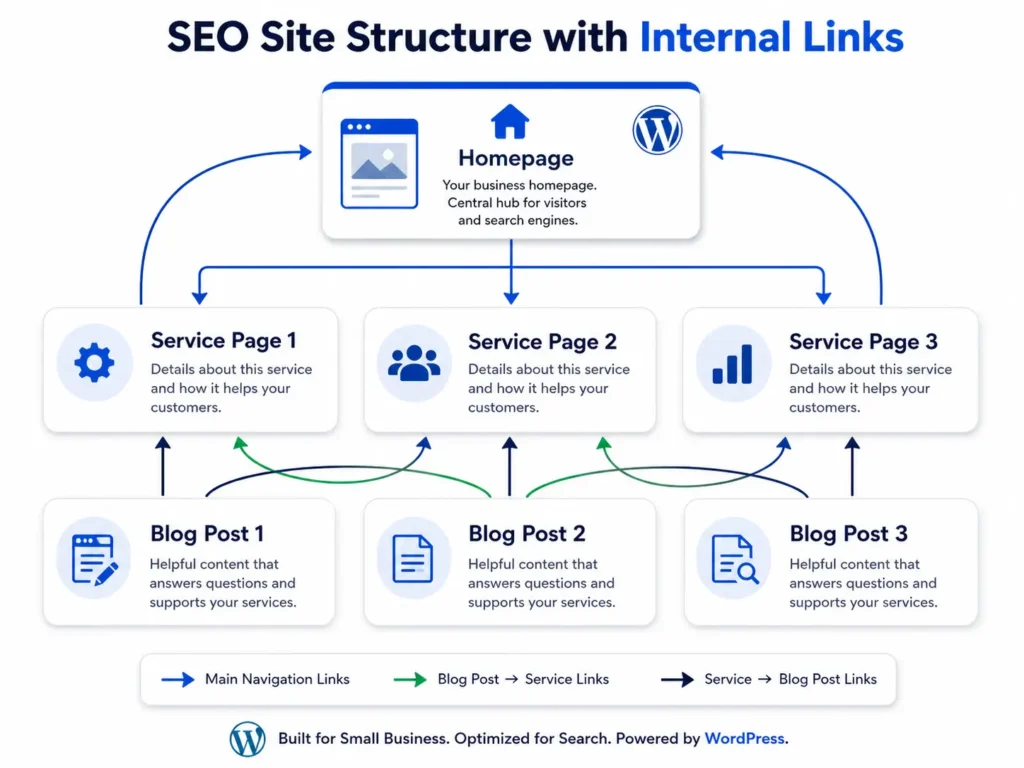
For businesses using Elementor, this guide on Elementor website design can help you understand how flexible layouts can still stay organized for SEO.
How a Tailored WordPress Site Helps Conversions
Ranking is only part of the goal. Your site also needs to turn visitors into leads. A tailored WordPress site can improve conversions by shaping each page around the visitor’s next decision.
A visitor usually wants to know four things before contacting you. Can you solve my problem? Do you understand my situation? Can I trust you? What should I do next?
Your page layout should answer those questions in order. Start with a clear headline and benefit. Add a short explanation of your service. Show proof through reviews, project samples, before-and-after results, or client outcomes. Then place a simple call to action.
For example, instead of saying “Welcome to our website,” a better homepage opening might say, “Websites built for service businesses that need more leads, clearer messaging, and easier updates.” That tells visitors what you do and why it matters.
Small changes can improve results. A clear button, shorter contact form, stronger headline, better mobile spacing, and more relevant proof can make the difference between a visitor leaving or requesting a quote.
How Much Should You Customize
Not every business needs a fully custom-coded site. The best choice is the level of customization that matches your goals.
Some businesses only need a custom layout using a reliable theme or builder. This can be efficient and cost-effective. Others need custom post types, advanced filtering, booking systems, membership areas, e-commerce functions, or integrations with CRM tools. Those require deeper development.
The key is not to customize everything just because you can. Customize what affects user experience, SEO, performance, and conversions.
For example, custom service page layouts may be worth it because they help explain your offer clearly. A custom testimonial section may be useful if social proof is important. But a complex animation that slows down the site may not be worth it.
A practical rule is simple: if the feature helps visitors understand, trust, or contact you, it is worth considering. If it only looks fancy and adds friction, skip it.
Common Mistakes to Avoid
One common mistake is choosing design before strategy. A beautiful site can still fail if the offer is unclear or the page structure is weak.
Another mistake is installing too many plugins. Plugins can add useful features, but too many can slow down the site or create maintenance problems. It is better to use reliable tools and only install what your site truly needs.
A third mistake is writing thin service pages. A service page should explain the problem, your process, who the service is for, expected results, and next steps. A few short sentences will not usually be enough to rank or convert.
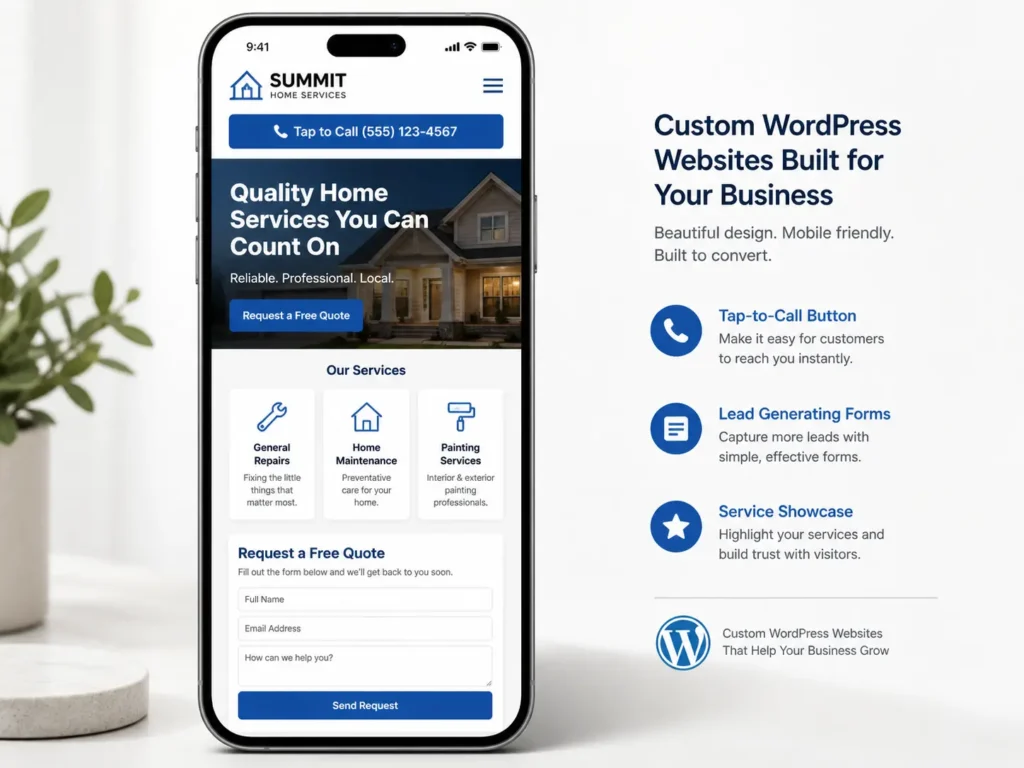
A fourth mistake is ignoring mobile. Many users will visit from a phone. Buttons should be easy to tap, text should be readable, images should load quickly, and forms should be simple.
A fifth mistake is launching without redirects or tracking. If you are redesigning an old site, old URLs need to be handled properly. You should also have analytics and conversion tracking ready so you can measure results.
Practical Tips Before You Start
Before building your site, write down your top three business goals. These might be more quote requests, better local visibility, more bookings, or a stronger portfolio presentation.
Next, list your main services and decide which ones deserve their own pages. If a service brings revenue and people search for it, it usually needs a dedicated page.
Then gather proof. This can include testimonials, project photos, reviews, case studies, certifications, awards, or client results. Strong proof makes your site more believable.
Finally, prepare your content early. Web design moves faster when your messaging, images, services, and calls to action are clear before development starts.
A tailored WordPress project is not just about getting a new design. It is about building a better system for how people find you, understand your value, and take action.
Final Thoughts: custom wordpress website
A custom wordpress website is worth it when your business needs more than a basic online presence. It gives you better control over design, SEO structure, user experience, and conversion paths, which makes it a smart choice for growing service businesses.
Start with your goals, then build the pages, content, and features around those goals. When your WordPress site is planned properly, it becomes easier to rank, easier to update, and easier for customers to trust.
Frequently Asked Questions
1. Can I build my own WordPress website?
Yes, you can build your own WordPress website, especially if you only need a simple site and have time to learn the platform. WordPress gives you control over pages, menus, themes, and plugins. The challenge is making the site strategic, fast, secure, mobile-friendly, and SEO-ready. If your website is important for leads or sales, professional help can save time and prevent costly rebuilds later.
2. Which is better, Wix or WordPress?
WordPress is usually better for flexibility and long-term SEO control, while Wix can be easier for beginners who want a quick setup. Wix works well for simple websites with basic needs. WordPress is often better when you need custom page structures, stronger blogging features, advanced SEO options, integrations, and room to grow. The better choice depends on whether you value simplicity or long-term control.
3. Can ChatGPT build a WordPress website?
ChatGPT can help plan and write parts of a WordPress website, but it cannot fully replace a skilled designer or developer. It can help with page outlines, headlines, content drafts, code snippets, FAQs, and SEO ideas. However, you still need proper design judgment, technical setup, plugin decisions, testing, security, speed optimization, and launch support. AI is useful as an assistant, not the whole build team.
4. How much does a custom WordPress site cost?
A custom WordPress site can cost anywhere from a few thousand dollars to much more, depending on the number of pages, design complexity, features, copywriting, SEO, integrations, and migration needs. A simple small business site costs less than a site with booking tools, e-commerce, custom templates, or advanced content types. The best way to price it is by scope, goals, and expected business value.
