
A website content checklist for small business helps you plan every page, message, and trust signal before you design or redesign your site. The best checklist covers your homepage, service pages, landing pages, SEO basics, proof, calls to action, and contact paths so visitors know what to do next.
For small business owners, website content is not just text on a page. It is the bridge between someone finding you online and deciding to call, book, request a quote, or trust your business.
Read on to learn what content your website needs, why each part matters, and which pages should come first when you want better leads from your site.
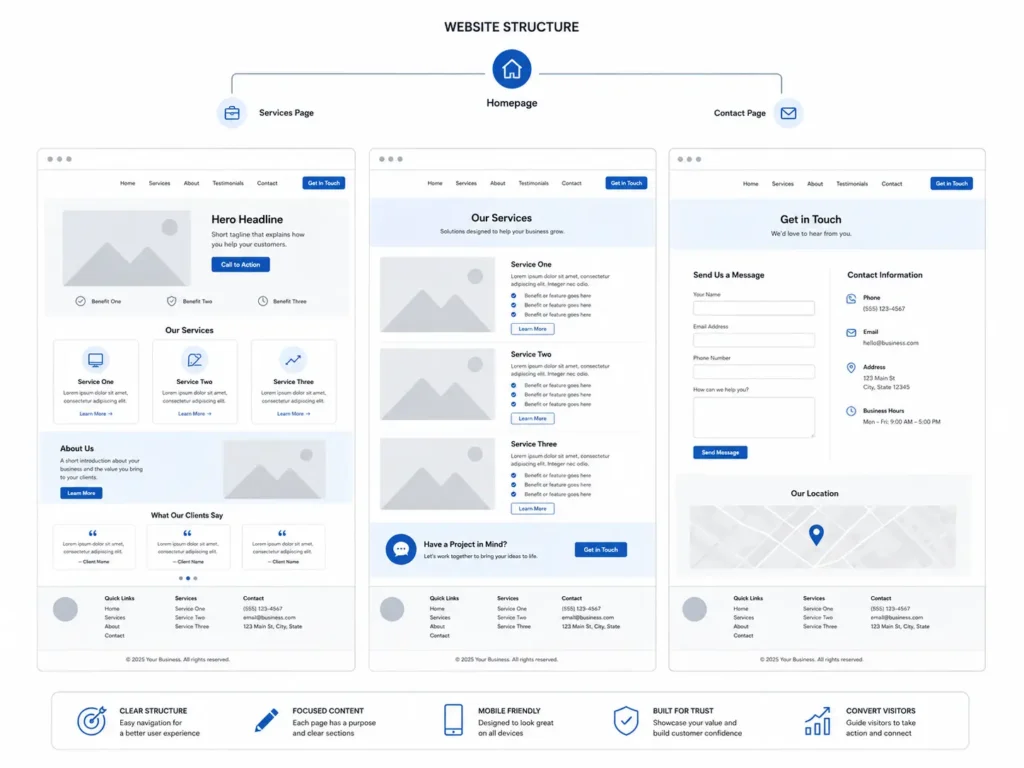
Why Website Content Matters for Small Businesses
A good-looking website can still fail if the content is unclear. Visitors need to understand who you help, what you offer, why they should trust you, and how to take the next step.
Google also needs clear content to understand your pages. The Google Search Central SEO starter guide explains that SEO helps search engines understand content and helps users decide whether to visit a site.
For a small business, that means your website should answer real customer questions, not just describe your company. A visitor might wonder:
✅ Do they serve my area?
✅ Can they solve my specific problem?
✅ Are they trustworthy?
✅ What does the process look like?
✅ How much will this cost?
✅ How do I contact them?
When your website answers these questions clearly, people stay longer and feel more comfortable taking action.
Start With the Core Pages First
Before adding advanced SEO pages or blog content, make sure your main pages are strong. These pages help people understand your business fast.
| Page | What It Should Include | Best Call to Action |
|---|---|---|
| Homepage | Clear headline, services, location, proof, main offer | Call now or request a quote |
| About Page | Your story, experience, values, team, local trust | Meet the team |
| Service Pages | What you do, who it helps, process, FAQs, proof | Book a consultation |
| Landing Pages | One offer, one audience, one action | Get started |
| Contact Page | Phone, form, email, service area, hours | Send a message |
| Portfolio Page | Past work, results, before and after examples | View more projects |
If your site feels outdated or unclear, a website redesign that converts can help clean up the message, improve the layout, and guide visitors toward action.
Homepage Content Checklist
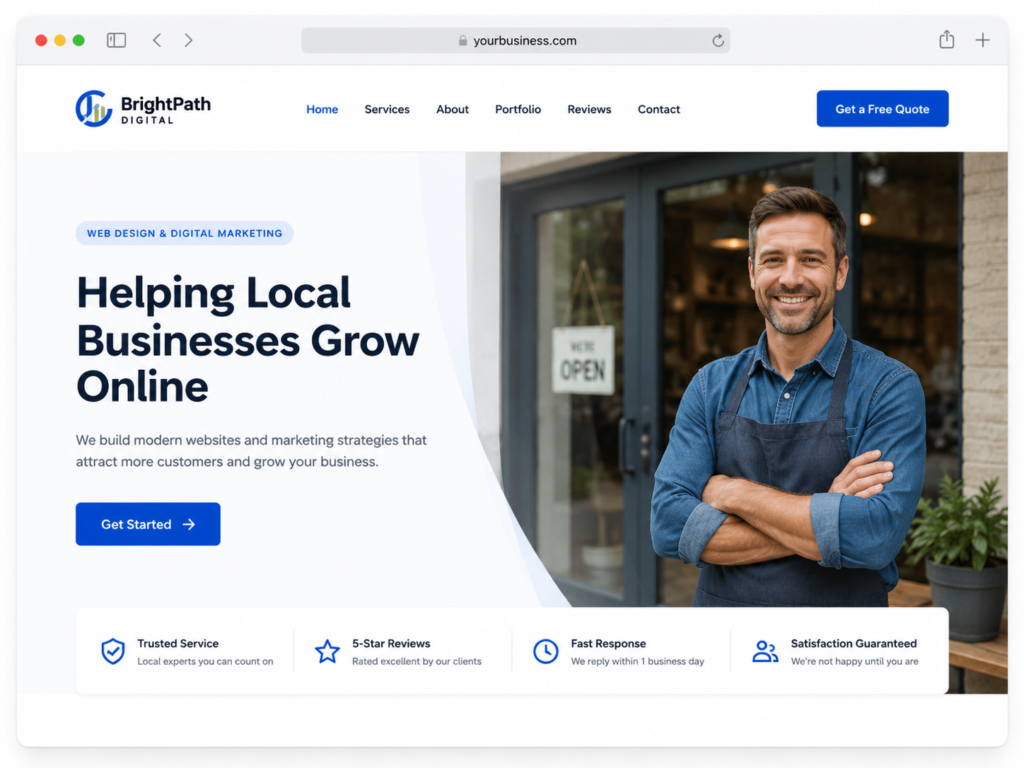
Your homepage is usually the first page people see. It should quickly explain what your business does and why someone should choose you.
A strong homepage should include:
✅ A clear headline that says what you do
✅ A short subheading that explains who you help
✅ A main call to action above the fold
✅ Your top services or product categories
✅ Reviews, testimonials, or trust badges
✅ A short section about your business
✅ Photos of your work, team, or location
✅ Links to service pages and contact page
✅ A final call to action near the bottom
The top section matters most. Avoid vague headlines like “Quality Solutions for Your Needs.” A better example is: “Custom Website Design for Local Service Businesses That Need More Calls.”
That kind of headline tells visitors what you do, who it is for, and what result they can expect.
Need help shaping your homepage strategy? Review this guide on how to plan a small business website before building or redesigning your pages.
Service Page Content Checklist
Service pages are where many small business websites lose leads. A service page should not just list what you offer. It should explain the problem, the solution, the process, and why your business is the right choice.
Each service page should include:
✅ Service name in the heading
✅ Short answer to what the service includes
✅ Common problems the service solves
✅ Benefits, not just features
✅ Who the service is best for
✅ Your process or steps
✅ Local service area details
✅ Testimonials or examples
✅ FAQs related to the service
✅ Clear contact button
For example, a web designer service page should not only say “we build websites.” It should explain whether the service includes copywriting, SEO setup, mobile design, speed optimization, hosting support, and launch help.
That level of detail helps customers compare options and feel confident before reaching out.
Landing Page Content Checklist
Landing pages work best when they focus on one offer. This could be a free audit, booking page, consultation, product promotion, seasonal service, or ad campaign.
A strong landing page should remove distractions. Keep the message tight and guide people toward one action.
Use this simple structure:
✅ Headline with the offer
✅ Pain point or goal
✅ Short explanation of the solution
✅ Benefits of taking action now
✅ Proof, reviews, or project examples
✅ Simple form or booking button
✅ FAQ section near the bottom
The best option for landing pages is a single CTA. Do not ask visitors to call, download, book, read a blog, and follow you on social media all at once. Pick the action that supports the campaign goal.
For businesses running ads, the landing page should match the ad message. If the ad says “Free Website Audit,” the page should focus only on that audit.
About Page Content Checklist
Your About page helps people feel safe choosing you. Small business customers often want to know who is behind the business before they call.
Include a short founder story, your mission, your experience, and what makes your approach different. Add real photos when possible. Stock photos can make a business feel less personal.
A good About page can include:
✅ Who you are
✅ Who you help
✅ Why you started
✅ What you believe in
✅ Your experience
✅ Your team
✅ Local connection
✅ CTA to contact or view services
For service businesses, trust matters. A personal About page can help you feel more approachable than a faceless competitor.
SEO Content Checklist
SEO content helps your website show up for the right searches. But stuffing keywords into every sentence will not help users. Your content should be helpful first, then optimized.
Google’s helpful content guidance focuses on people-first content, page experience, and trust signals.
Use this SEO checklist for each important page:
| SEO Element | What to Check | Practical Tip |
|---|---|---|
| Page Title | Include main topic and location if needed | Keep it clear and clickable |
| Meta Description | Summarize the page and benefit | Add a reason to click |
| H1 Heading | Match the page intent | Use only one main H1 |
| Subheadings | Organize answers clearly | Use H2s for major sections |
| Internal Links | Link to related services and blogs | Use natural anchor text |
| Images | Add descriptive alt text | Use real photos when possible |
| Local Terms | Mention service areas naturally | Avoid city stuffing |
| FAQs | Answer buyer questions | Use short, direct answers |
| CTA | Tell users what to do next | Repeat near key sections |
For technical checks, run important pages through PageSpeed Insights because faster pages can improve user experience across devices.
If you need a stronger layout and SEO-ready structure, view these portfolio highlights to see how content and design can work together.
Trust Content Checklist
Trust content helps visitors believe your business can deliver. This is especially important for websites that sell services, quotes, consultations, bookings, or higher-ticket offers.
Add trust signals throughout the site, not only on one page.
Useful trust content includes:
✅ Customer reviews
✅ Before and after examples
✅ Case studies
✅ Certifications or licenses
✅ Years of experience
✅ Real business photos
✅ Team photos
✅ Clear pricing guidance
✅ Guarantees or service promises
✅ Security badges for forms and payments
The best trust signal depends on your business. A contractor may need project photos. A consultant may need testimonials and case studies. A web designer may need examples of live websites, redesigns, and client results.
For example, a local service business can add a short review beside each service section. This makes the proof appear right when the visitor is deciding whether to keep reading.
Call to Action Checklist
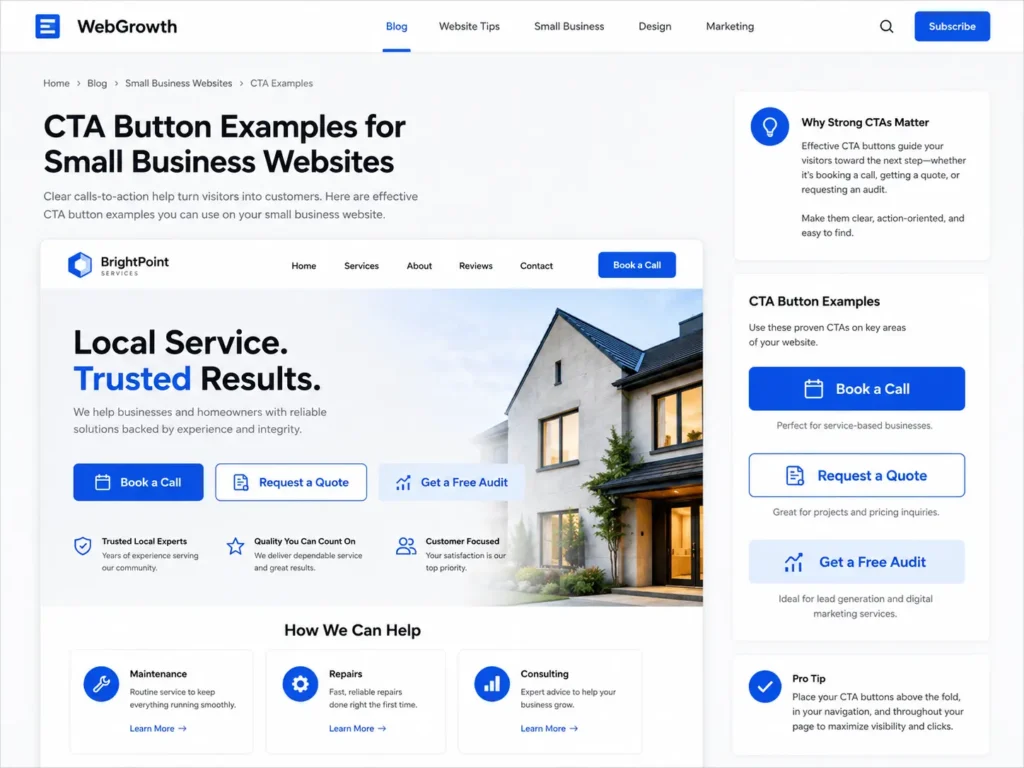
A website without clear calls to action makes visitors guess. Every major page should tell people what step to take next.
Good CTA examples include:
✅ Request a quote
✅ Book a consultation
✅ Schedule a call
✅ Get a free website audit
✅ View our work
✅ Start your project
✅ Contact us today
The best CTA is specific to the visitor’s intent. Someone reading a blog may not be ready to buy, so “Read our website planning guide” may work. Someone on a service page is closer to action, so “Book a consultation” may be better.
For web design help, connect with conversion-focused web design so your content, layout, and CTAs support leads instead of just looking nice.
Contact Page Checklist
Your contact page should be simple, complete, and easy to use. Do not make people hunt for your phone number or wonder if you serve their area.
Include:
✅ Phone number
✅ Email address
✅ Contact form
✅ Business hours
✅ Service area
✅ Physical address if applicable
✅ Map if you serve walk-in customers
✅ Response time expectation
✅ Short privacy note near the form
A practical tip: test your contact form every month. Many small businesses lose leads because forms break, messages go to spam, or the confirmation message is unclear.
Your contact page should also reduce hesitation. Add a line like: “Tell us what you need help with, and we’ll reply with the next best step.”
Blog Content Checklist
Blog content helps answer early-stage questions. Not every visitor is ready to hire today. Some are researching problems, comparing options, or learning what kind of help they need.
Good blog topics for small business websites include:
✅ How much does a website redesign cost?
✅ Do I need a landing page or full website?
✅ What should a service page include?
✅ How do I choose a web designer?
✅ Why is my website not getting leads?
Blogs should link naturally to service pages. For example, a post about redesign planning can link to your service page when the reader is ready for help.
You can also guide readers to helpful related content, such as how to hire a remote web designer or what to look for in a website designer for US small business.
Which Content Should You Prioritize First?
If your website is new or underperforming, do not try to fix everything at once. Start with the pages closest to money and leads.
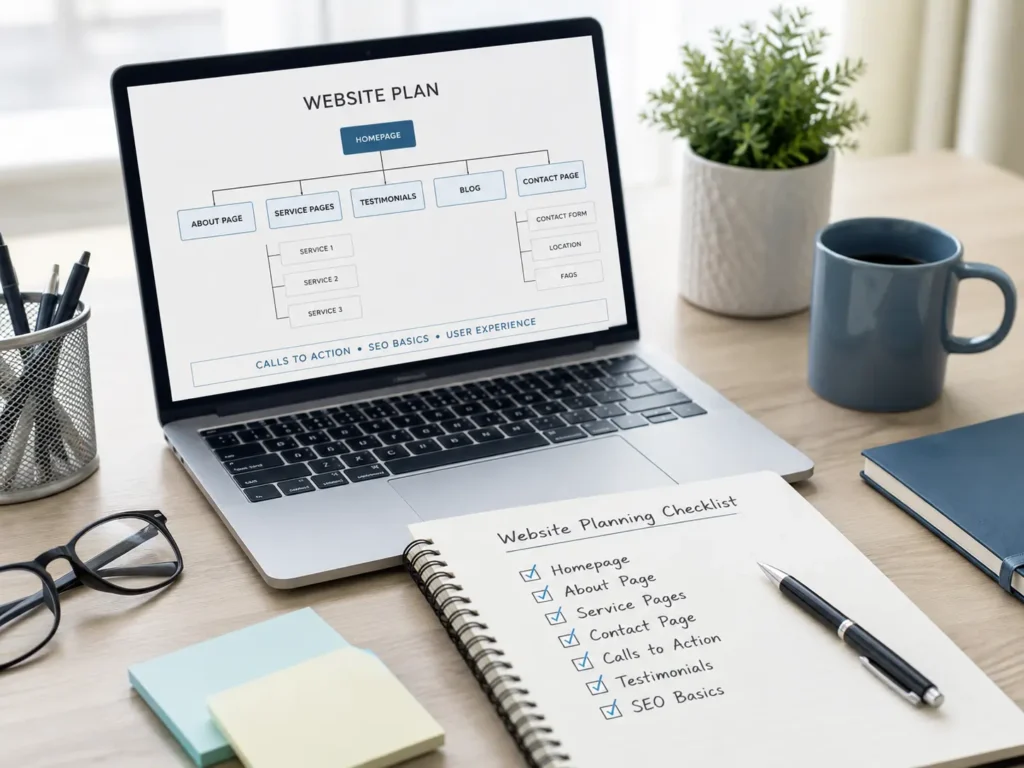
The best order is:
✅ Homepage
✅ Main service page
✅ Contact page
✅ About page
✅ Portfolio or proof page
✅ Landing page for top offer
✅ Blog content for SEO support
This order works because it improves the core buyer journey first. Once your main pages are clear, blog posts and SEO content can support them.
For example, if you are a local web design studio, your service page should explain your process before you publish ten blog posts. A blog can bring traffic, but the service page turns that traffic into inquiries.
Common Website Content Mistakes to Avoid
Many small business websites have the same content problems. The good news is that most are easy to fix.
The biggest mistake is being too vague. Phrases like “we offer quality service” do not tell visitors what you actually do. Be specific about the service, result, location, and next step.
Another mistake is hiding important details. If you serve specific cities, say so. If your process has three steps, explain them. If your pricing depends on project size, give a starting range or explain what affects cost.
A third mistake is using too many CTAs. A page with five different actions can confuse people. Keep the main action clear.
Also avoid long blocks of text. Break content into short sections, tables, and clear headings so visitors can scan quickly.
Quick Practical Tips Before Publishing
Before your website goes live, read each page like a customer. Ask yourself: “Can I understand this in 10 seconds?”
Use these quick checks:
✅ Does the page say what the business does?
✅ Is the main offer easy to understand?
✅ Is there proof near the offer?
✅ Is the CTA visible without scrolling too much?
✅ Does the page answer common buyer questions?
✅ Are internal links helpful and natural?
✅ Does the page load properly on mobile?
A simple 3-second test also helps. Show your homepage to someone unfamiliar with your business for three seconds. Then ask what your company does. If they cannot answer, your headline needs work.
Final Check: website content checklist for small business
A clear website can help your small business build trust, explain your services, and turn more visitors into leads. The right content tells people what you do, who you help, why they should trust you, and how to take action.
Start with your homepage, service pages, contact page, and proof sections. Then improve your SEO, landing pages, and blog content over time. When your message is clear and your pages are easy to use, your website becomes more than an online brochure. It becomes a lead generation tool for your business.
Frequently Asked Questions
1. What should a small business website include?
A small business website should include clear service information, trust signals, and easy contact options so visitors can quickly decide if your business is the right fit. At minimum, your site should have a homepage, about page, service pages, contact page, testimonials, and calls to action. If you serve a local area, include your location and service areas too.
2. How often should a small business redesign its website?
A small business should consider a redesign when the website looks outdated, loads slowly, has poor mobile design, or is not generating leads. Many businesses review their website every two to three years, but performance matters more than age. If visitors are not calling, booking, or submitting forms, your content, layout, or user path may need improvement.
3. Do landing pages help small businesses get more leads?
Yes, landing pages can help small businesses get more leads because they focus visitors on one offer and one action. Unlike a general homepage, a landing page is built for a specific campaign, service, audience, or location. This makes it useful for ads, email campaigns, free audits, consultations, seasonal services, and booking-focused promotions.
4. Should I hire a web designer or build my website myself?
You can build a simple website yourself, but hiring a web designer is often better when you need strategy, SEO structure, mobile design, trust-building content, and lead-focused pages. A professional designer can help organize your message, improve user experience, and create pages that guide visitors toward calls, bookings, quote requests, or consultations.
