
A website project checklist for small business owners should cover goals, pages, content, design, SEO, trust signals, calls to action, and launch testing. It helps you avoid missed details, control scope, and give your web designer everything needed to build a site that attracts leads, calls, and bookings.
Whether you are building a new site, refreshing an outdated one, or creating a focused landing page, a checklist keeps the project moving in the right order. It also helps you decide what to prepare yourself and what is better handled by a professional.
If you want expert help turning your ideas into a polished website, start with small business web design experts who understand strategy, trust, and conversions.

Why a Website Checklist Matters for Small Businesses
A website is not just a digital brochure. For most small businesses, it works as the first impression, sales assistant, appointment setter, and trust builder. If the site is confusing, slow, outdated, or missing key information, visitors may leave before calling or booking.
A checklist helps you think through the project before design begins. This matters because most delays happen when business owners are unsure about page content, service details, photos, offers, or calls to action. When those pieces are prepared early, the web designer can focus on building a cleaner and more effective site.
It also helps you avoid building around personal preference only. A good website should look professional, but it should also answer customer questions fast. People want to know what you offer, who you help, where you serve, what makes you trustworthy, and how to take the next step.
The best option for many small businesses is to plan the website around one main goal first. That goal could be calls, bookings, quote requests, online purchases, or consultation forms. Once the goal is clear, every page can support that action.
Website Planning Checklist: What to Prepare First
Before you hire a designer, gather the basics that shape the website. This does not need to be perfect, but it should be clear enough to guide the project.
| Project Item | Why It Matters | Best Option |
|---|---|---|
| Business goal | Keeps the site focused on leads, calls, sales, or bookings | Choose one primary goal |
| Target audience | Helps shape copy, images, and page structure | Define your ideal customer |
| Core services | Makes your offer easy to understand | List top 3 to 5 services |
| Service areas | Helps with local SEO and customer clarity | Add city or region details |
| Brand assets | Keeps visuals consistent | Prepare logo, colors, and photos |
| Trust signals | Builds confidence before contact | Add reviews, licenses, case studies |
Start with your business goal because it affects everything else. A service business that wants phone calls needs visible phone buttons, mobile-friendly layouts, and simple contact sections. A consultant who wants booked appointments may need a scheduling button, proof of expertise, and a strong service page. A local shop may need location details, hours, product categories, and map visibility.
If you are not sure how to organize these items, review what to prepare before hiring a web designer so your handoff is smoother.
Which Website Option Fits Your Business Best?
Not every business needs a full website build. Some need a redesign, some need a landing page, and some only need a better structure for their current content. Choosing the right option saves time and prevents overspending.
A new website is best when your business has no proper online presence yet, or your current site does not explain what you do. This is common for new businesses, rebrands, or companies moving away from DIY platforms.
A redesign is best when your website already exists but no longer builds trust. Signs include outdated visuals, weak mobile layout, slow loading, unclear service pages, low conversion rates, or a design that no longer matches your brand.
A landing page is best when you have one focused offer. This could be a seasonal service, paid ad campaign, event, lead magnet, or local promotion. A landing page works well when the visitor needs one clear path instead of many menu choices.
| Website Type | Best For | Main Goal |
|---|---|---|
| New website | New businesses or major rebrands | Build a complete online presence |
| Website redesign | Existing sites that look outdated or underperform | Improve trust and conversions |
| Landing page | One service, ad campaign, or offer | Get leads from one focused action |
| SEO refresh | Sites with decent design but poor visibility | Improve search structure and content |
If you need help deciding which path fits your current stage, explore website design & development services to compare what can be built or improved.
Content Checklist for Each Important Page
Your website content should make it easy for people to understand your business. Many small business sites lose leads because the pages talk too much about the company and not enough about the customer’s problem.
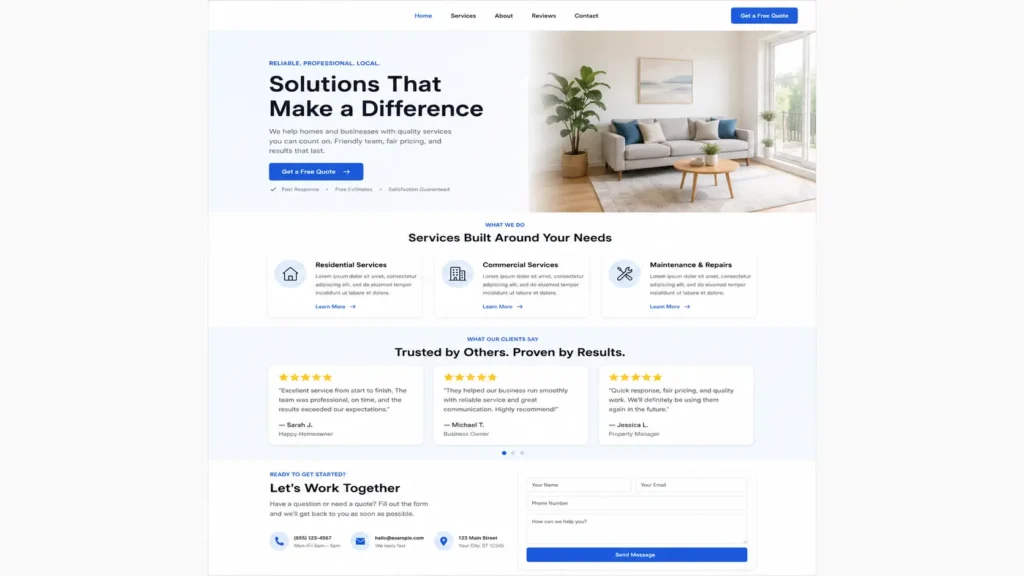
Your homepage should quickly explain what you do, who you help, where you serve, and what action visitors should take. It should also guide people to your main services, reviews, sample work, and contact section.
Your service pages should be more specific. Each service page should answer what the service includes, who it is for, how the process works, what results customers can expect, and why your business is a trustworthy choice.
Your about page should not just tell your story. It should explain why your experience matters to the customer. Add your mission, background, values, and any proof that supports your expertise.
Your contact page should be simple. Include a form, phone number, service area, business hours, and what happens after someone reaches out. If customers can book online, make the booking button easy to see.
Use this simple page flow:
✅ Clear headline
✅ Short answer to the visitor’s main question
✅ Benefits or service details
✅ Proof such as reviews or past work
✅ Strong call to action
For inspiration on layout quality, check portfolio highlights and notice how clear structure helps people understand the offer faster.
Design Checklist: Building Trust at First Glance
Design is not only about colors and fonts. It affects whether visitors feel safe enough to contact you. A clean layout, consistent branding, readable text, and professional images can make a small business look established and reliable.
The best design choice is one that supports clarity. Avoid layouts that look creative but make people work too hard to find information. Small business visitors usually want answers quickly. They are comparing options, checking credibility, and deciding if your business feels like the right fit.
Make sure your design includes strong trust elements. Add real reviews, client logos if available, before-and-after images, project samples, certifications, awards, or team photos. These details help reduce doubt.
Your design should also work well on mobile. Many customers will find your business from a phone, especially if they are searching for local services. If the phone number, booking button, or contact form is hard to use on mobile, the site can lose leads even if it looks good on desktop.
A good designer will also help you avoid clutter. White space, clear headings, readable paragraphs, and simple navigation can make the site feel more premium and easier to use.
SEO Checklist Before Launch
SEO should not be added only after the design is finished. It should be part of the website plan from the beginning. This helps your pages have the right structure, keywords, headings, internal links, and metadata.
Start with page intent. Each page should answer a clear search need. For example, a service page should explain the service, location, benefits, process, pricing factors, and next step. A blog post should answer a specific question that potential customers are already asking.
Use the Google SEO starter guide as a helpful reference for understanding how search engines read and organize website content. You do not need to overcomplicate SEO, but your pages should be easy for both people and search engines to understand.
Your SEO checklist should include:
✅ One clear title for each page
✅ Helpful meta description
✅ Clean URL slug
✅ Proper heading order
✅ Internal links to important pages
✅ Image alt text
✅ Local service area mentions where natural
✅ Fast loading pages
For RankMath, make sure your focus keyword appears in important areas without stuffing. Your title, intro, meta description, headings, and internal links should feel natural. The goal is not to repeat words as much as possible. The goal is to create the clearest and most helpful page for the searcher.
Technical and Conversion Checklist
A beautiful website can still underperform if the technical setup is weak. Before launch, test the parts that affect speed, usability, tracking, and conversion.
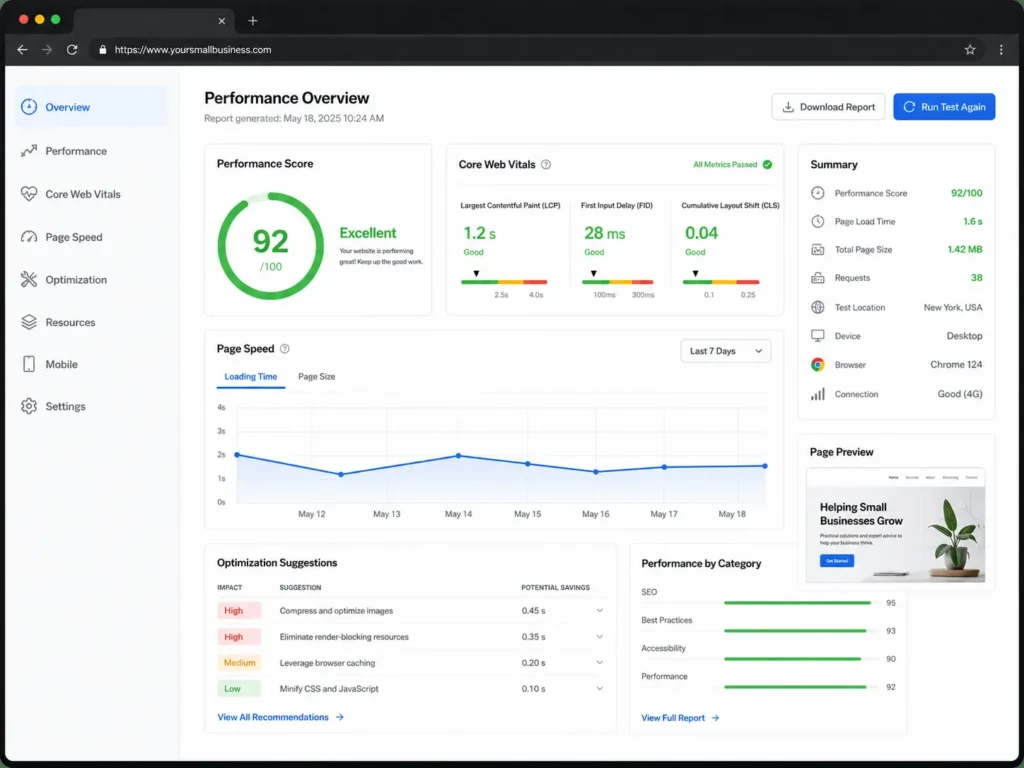
Run your site through PageSpeed Insights to check loading performance. A slow site can frustrate visitors, especially on mobile. Compress large images, avoid unnecessary scripts, and keep the layout lightweight.
Check your forms too. Submit a test inquiry and make sure it goes to the correct email. Test phone links on mobile. Test booking buttons. Click every menu item. Make sure thank-you pages, confirmation messages, and notifications work properly.
You should also connect analytics before launch. This helps you understand where visitors come from, which pages they view, and which pages lead to inquiries. Without tracking, it is harder to know what is working.
Conversion details matter most near the top and bottom of each page. Use clear buttons such as “Request a Quote,” “Book a Call,” or “Schedule a Consultation.” Avoid vague buttons like “Submit” or “Learn More” when the visitor is ready to act.
Hiring a Web Designer: What to Ask Before You Start
Hiring a web designer is easier when you know what questions to ask. The right designer should not only make the site look better. They should understand your business goal, your customers, your services, and how the website will support leads.
Ask what is included in the project. Some designers only handle visuals, while others include strategy, copy guidance, SEO setup, mobile optimization, and launch support. Knowing this early prevents confusion later.
Ask about the process. A professional should explain discovery, sitemap planning, content collection, design, revisions, development, testing, and launch. If there is no clear process, the project may become stressful.
Ask how they handle calls to action. A small business website should guide visitors toward action, not just display information. The designer should think about contact buttons, quote forms, booking flows, and trust sections.
Ask if they have experience with businesses like yours. You do not always need someone in the same exact industry, but it helps if they understand local service businesses, lead generation, and SEO basics. If you are open to flexible hiring, read this guide on how to hire a remote web designer.
Practical Tips to Keep the Project on Track
One of the best ways to keep a website project smooth is to create one shared folder before work begins. Add your logo, brand photos, team photos, service descriptions, testimonials, login access, and inspiration websites. This saves time and reduces back-and-forth messages.
Write short notes about what you like and dislike about your current site. Do not just say “make it modern.” Explain if you want better mobile layout, clearer services, faster loading, stronger contact buttons, or a more premium look.
Prepare your customer questions too. These questions often become strong website content. If customers always ask about pricing, turnaround time, service area, process, guarantees, or booking steps, your website should answer those topics clearly.
Set one decision maker for feedback. Too many opinions can slow the project and weaken the design direction. Gather input if needed, but let one person organize the final comments.
Most importantly, judge the website by usefulness, not just looks. A strong site should make visitors feel informed, confident, and ready to take action.
Common Website Project Mistakes to Avoid
A common mistake is starting with design before strategy. This often leads to a nice-looking website that does not guide visitors well. Strategy should come first because it defines the pages, messaging, and conversion path.
Another mistake is using thin content. A service page with only a few sentences may not give customers enough confidence. It may also limit SEO performance because search engines and users need more context.
Some businesses hide their contact options. Your phone number, form, or booking button should be easy to find. If people have to search for the next step, they may leave.
Avoid using stock photos only. Stock images can help in some cases, but real photos build stronger trust. Use real team photos, workspace images, project examples, or customer results when possible.
Finally, do not skip post-launch updates. A website is not finished forever after launch. Review performance, update services, add new testimonials, publish helpful blog content, and improve weak pages over time. For more small business website guidance, see this resource on hiring a website designer for U.S. small business.

Final Thoughts: website project checklist for small business
A strong website starts with clear planning. When you know your goals, pages, content, design needs, SEO basics, and conversion steps, the whole project becomes easier to manage.
The best checklist is not just a list of tasks. It is a guide that helps your business make better decisions. It shows what to prepare, how to work with a designer, and which website option fits your current goal.
If your current site is outdated, confusing, or not bringing enough leads, professional help can make the process easier. A well-planned website can build trust faster, explain your offer clearly, and turn more visitors into calls, bookings, and inquiries.
Frequently Asked Questions
1. What should be included in a small business website checklist before hiring a designer?
A small business website checklist should include your business goal, target audience, core services, service areas, brand assets, page list, customer questions, reviews, photos, and preferred calls to action. The clear project scope is the most important part because it helps your designer understand what needs to be built, what content is missing, and how the website should support leads, calls, bookings, or quote requests.
2. How does a website checklist help a small business get more leads?
A checklist helps you plan the website around customer action instead of random design choices. The lead-focused website plan should define where buttons go, what pages need forms, which services need stronger explanations, and what trust signals should appear before someone contacts you. This makes the visitor journey smoother and reduces confusion, which can help more people call, book, or request a quote.
3. Do I need a redesign checklist if my business already has a website?
Yes, a redesign checklist is useful if your current website looks outdated, loads slowly, has weak mobile usability, or does not generate enough inquiries. The redesign checklist helps you review what to keep, what to remove, which pages need stronger copy, and where trust signals should be added. It also helps your designer improve the site without losing important content or SEO value.
4. Should I hire a web designer or build my small business website myself?
You can build a simple site yourself if your needs are basic, your budget is tight, and you have time to learn the platform. However, hiring a professional web designer is usually better when your website needs strategy, SEO structure, strong branding, service pages, mobile optimization, and lead-focused design. A designer can help avoid mistakes that make the site look unfinished or fail to convert visitors.