
The small business website cost usually ranges from free DIY setup to $1,500+ for a professional informational site, with hosting and tools billed monthly. The best option depends on your goals, how fast you need leads, and whether your site must include booking, ecommerce, SEO, or custom design.
A simple brochure website costs less because it needs fewer pages and features. A conversion-focused website costs more because it includes strategy, copy, speed optimization, mobile layout, search structure, and stronger calls to action.
If you want a site that looks polished and helps people contact you faster, start with small business web design experts.
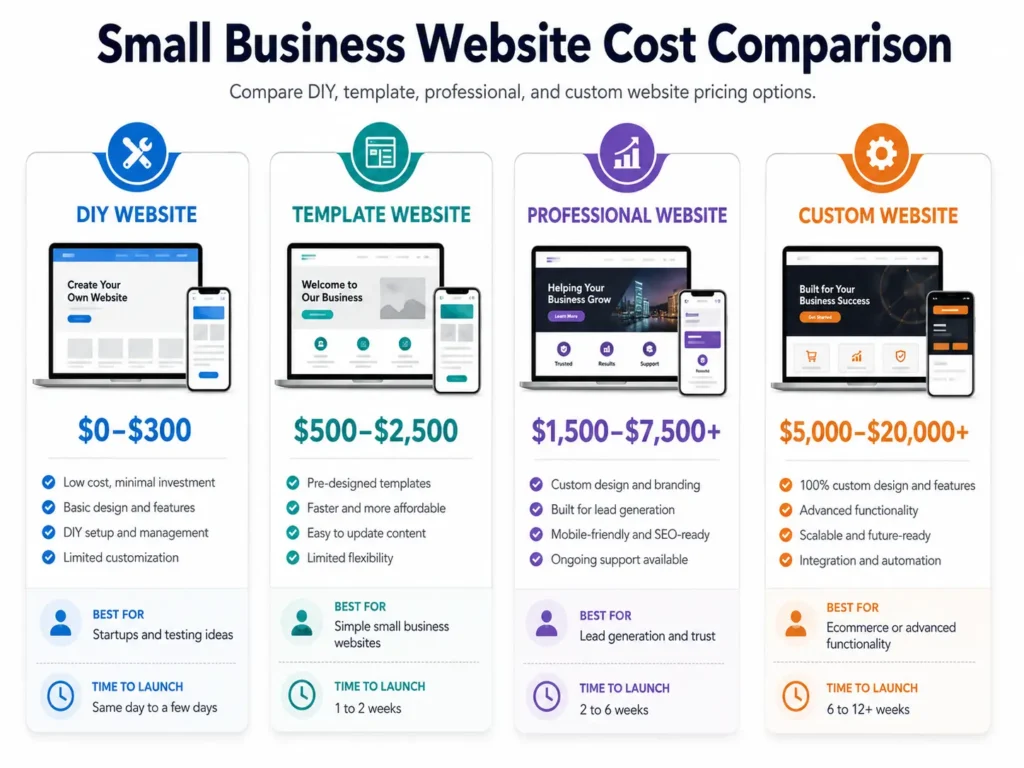
What Affects the Price of a Business Website?
Website pricing changes because every business needs a different level of planning, content, design, and function. A local plumber may need a homepage, service pages, reviews, and a booking form. A boutique may need product pages, payments, shipping settings, and inventory tools.
The biggest cost factors are:
✅ Number of pages
✅ Custom design versus template design
✅ Copywriting and SEO setup
✅ Booking, payments, or ecommerce features
✅ Mobile responsiveness
✅ Website speed and security
✅ Ongoing maintenance and support
Forbes lists common informational website costs as $0 to $450 for DIY setup, $1,500 and up for professional website design, and $15 to $150 monthly for hosting and apps. Use those numbers as a planning baseline, then adjust based on your required features. Forbes 2026 website cost guide
Quick Website Cost Breakdown
A business website should not be priced only by the number of pages. A five-page website with strong messaging, fast loading, and clear conversion paths can perform better than a twenty-page site with weak structure.
| Website Type | Typical Cost Range | Best For | Why It Costs That Much |
|---|---|---|---|
| Free DIY site | $0 to $300 setup | Testing an idea | You handle design, content, images, and setup |
| DIY builder with paid plan | $15 to $150 monthly | Simple online presence | Builder, hosting, apps, and templates are bundled |
| Template WordPress site | $500 to $2,500 | Small service businesses | Uses a premade design with light customization |
| Professional business site | $1,500 to $7,500+ | Lead generation | Includes strategy, layout, copy, SEO basics, and mobile design |
| Ecommerce or custom site | $5,000 to $20,000+ | Online stores or complex needs | Needs payments, products, security, integrations, and testing |
| Redesign project | $1,500 to $10,000+ | Existing sites that look outdated | Includes content cleanup, migration, design, and conversion fixes |
These ranges are not fixed quotes. They help you compare options before asking for a proposal.
Why Some Websites Cost More Than Others
A cheap website often uses a template and basic content. That can work for a brand-new business that only needs a simple online profile.
A higher-priced website usually includes deeper work behind the scenes. This may include competitor research, page strategy, copywriting, mobile layout, technical SEO, image optimization, analytics setup, contact form testing, and post-launch support.
The real question is not only, “How much is the website?” The better question is, “What should this website help my business do?”
✅ If your website only needs to prove you exist, a simple option may be enough.
✅ If your website needs to generate calls, quote requests, bookings, or sales, investing in better structure usually makes more sense.
For service businesses, a professional site is often the best middle ground because it balances cost, trust, and conversion. You can review website design & development services if you want a clearer view of what a full build can include.
DIY Website vs Professional Website
A DIY website is tempting because it looks affordable at first. You can use a builder, choose a template, add your logo, write a few paragraphs, and publish quickly.
That works when you have a small budget and enough time to learn. The downside is that many DIY sites look similar, load slowly after too many apps, or miss important conversion sections like testimonials, clear service pages, strong calls to action, and local SEO structure.
A professional website costs more because someone plans the experience for your customers. The design is not only about colors. It is about helping visitors understand what you do, trust you, and take the next step.
If your current site already exists but feels outdated, read this guide on a website redesign that looks professional.
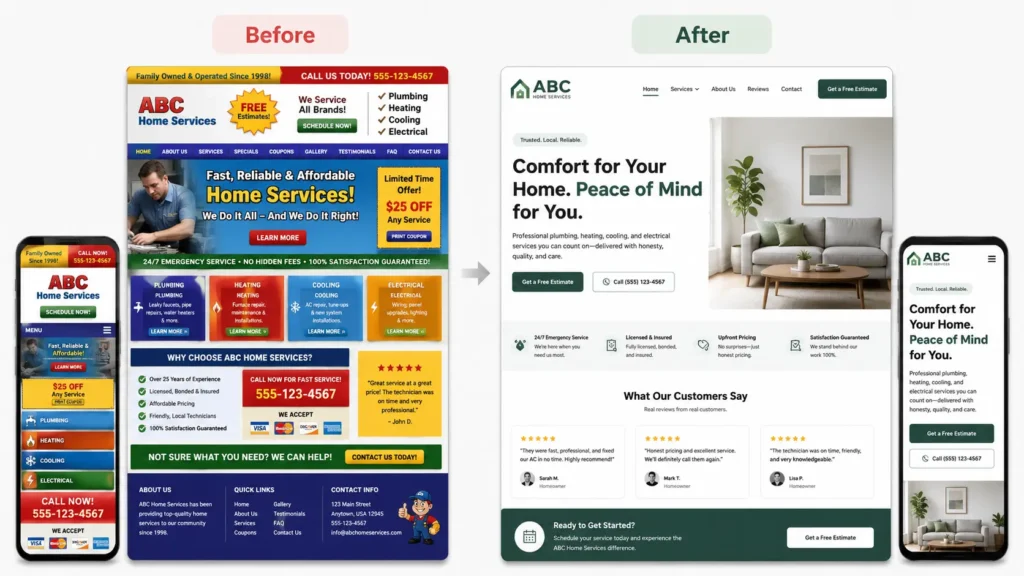
Which Website Option Is Best for You?
The best website option depends on where your business is right now. A startup with no customers has different needs from an established local business that gets steady referrals but wants more online leads.
| Your Situation | Best Option | Why This Is Applicable |
|---|---|---|
| You are testing a new idea | Free or low-cost DIY builder | Keeps spending low while you validate the offer |
| You need a simple online presence | Template website | Gives you a faster launch without full custom cost |
| You rely on calls, forms, or bookings | Professional service website | Better for trust, conversion, SEO, and mobile experience |
| You already have traffic but low leads | Website redesign | Fixes messaging, layout, speed, and calls to action |
| You sell products online | Ecommerce website | Supports payments, product pages, checkout, and shipping |
| You want long-term growth | Custom strategy website | Built around SEO, content, conversion, and scalability |
For many small businesses, the best practical option is a professional five to eight-page website. That usually gives you enough room for a homepage, about page, services, service detail pages, reviews, contact page, and local SEO content.
You can also browse portfolio highlights to compare what a polished website can look like in real projects.
How to Budget Without Overpaying
Start by writing down what your website must do. Do you need phone calls, form submissions, appointments, product sales, quote requests, or newsletter signups?
Once you know the goal, decide what pages are required. A common local service website may need:
✅ Homepage
✅ About page
✅ Main service page
✅ Individual service pages
✅ Gallery or sample work page
✅ Testimonials section
✅ Contact page
Avoid paying for features you do not need yet. A new service business may not need a full customer portal, complex animation, or dozens of pages at launch.
At the same time, avoid cutting the parts that affect trust. Professional photos, clear copy, fast mobile design, reviews, and strong calls to action matter because they help visitors decide.
For more visual trust-building ideas, check this guide on website design that looks professional.
Hidden Website Costs to Plan For
Many business owners only budget for the design and forget the ongoing costs. A website is more like a business asset than a one-time flyer.
You may need to pay for:
✅ Domain renewal
✅ Hosting
✅ Premium plugins or apps
✅ Email accounts
✅ Security tools
✅ Maintenance
✅ Content updates
✅ SEO work
✅ Image or copy refreshes
A basic website may only need light maintenance. A website with ecommerce, booking tools, or many plugins needs more regular checks because updates can affect forms, checkout pages, or site speed.
Google’s SEO Starter Guide explains that SEO helps search engines understand your content and helps users decide whether to visit your site. It also recommends useful content, descriptive URLs, good link text, images with helpful alt text, and logical site organization. Google’s SEO Starter Guide
How to Make Your Website Worth the Cost
A website becomes worth the cost when it supports a clear business outcome. That outcome may be calls, bookings, email inquiries, walk-ins, or online sales.
Here is a simple way to think about value:
If your website brings in one extra customer per month, how much is that customer worth? For a consultant, contractor, dentist, photographer, or home service company, one new client can often cover a large part of the website investment.
Make every major page answer three questions:
✅ What do you offer?
✅ Why should someone trust you?
✅ What should they do next?
Place your call to action near the top, after key service sections, and near the end of each page. Use plain wording like “Request a Quote,” “Book a Call,” or “View Our Work.”
If your brand needs a broader refresh, this business website makeover guide can help you think through layout, copy, and trust signals.
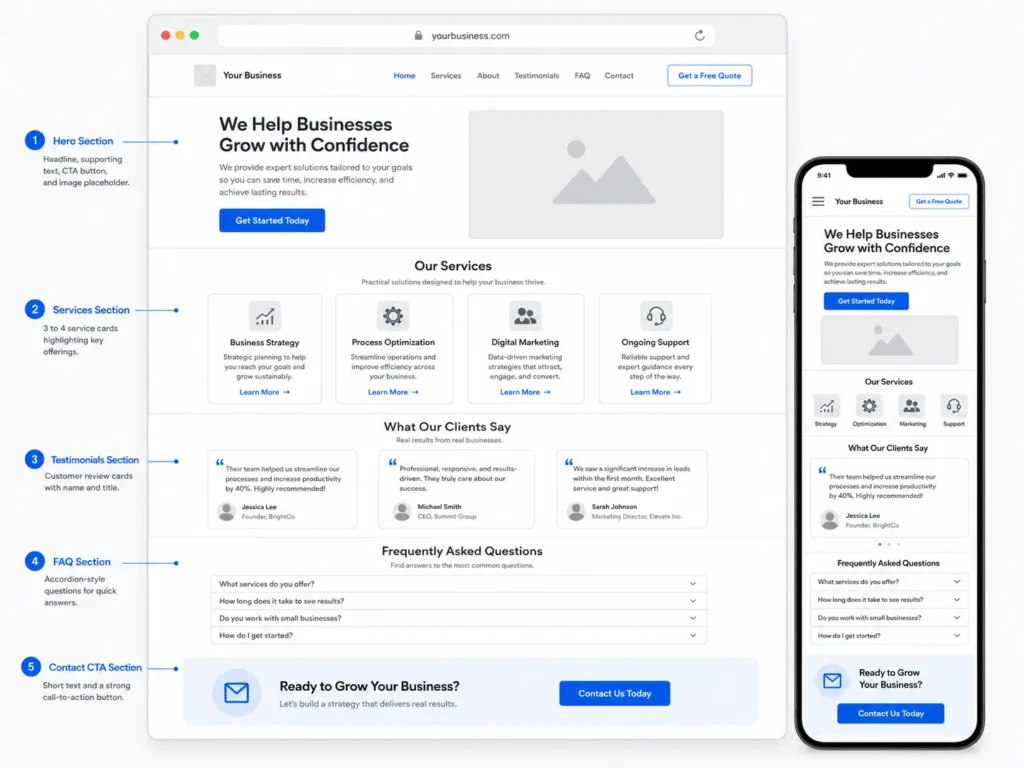
What Should Be Included in a Professional Website Quote?
A good website quote should explain what is included, not just the final price. If the proposal only says “website design,” ask for more detail.
Look for these items:
✅ Number of pages
✅ Platform used
✅ Design process
✅ Copywriting support
✅ Mobile optimization
✅ Basic SEO setup
✅ Contact form setup
✅ Speed optimization
✅ Image sourcing or editing
✅ Revisions included
✅ Timeline
✅ Training or handoff
✅ Maintenance options
The quote should also explain what is not included. This prevents surprise costs for paid plugins, copywriting, stock photos, advanced SEO, ecommerce setup, or ongoing updates.
A clear quote protects both sides. You know what you are paying for, and the designer knows exactly what must be delivered.
Can You Build a Free Website?
Yes, you can build a free website using some website builders, but there are tradeoffs. Free plans often include platform branding, limited storage, fewer design options, no custom domain, or restricted features.
A free site can work for testing a business idea. It is not usually the best choice for a serious local business because customers may trust a branded domain more than a free subdomain.
A free website is applicable when:
✅ You are validating an offer
✅ You do not need search visibility yet
✅ You only need a temporary page
✅ You are comfortable learning the builder
A paid website is better when you need credibility, custom branding, SEO structure, lead capture, or long-term growth.
Rank Math Tips for Higher Blog and Website Scores
To improve your Rank Math score, your page should be clear, helpful, and structured around search intent. Do not force keywords into every paragraph. Use natural variations like website pricing, business website budget, web design cost, and professional site pricing.
Helpful setup tips:
✅ Use the keyword in the meta description
✅ Keep the URL short and descriptive
✅ Add internal links to service pages and related blogs
✅ Add two trusted external links
✅ Use image alt text that describes the image
✅ Include FAQs that answer real buyer questions
✅ Add a clear call to action near the end
Rank Math can guide optimization, but the page still needs to help real readers make a decision.
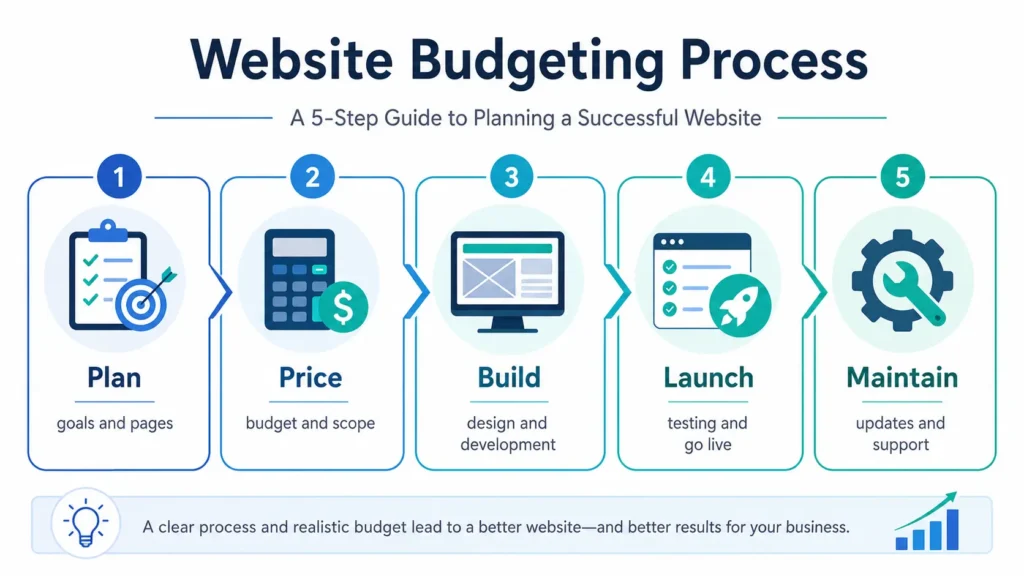
Final Thoughts on small business website cost
The right website budget depends on your business goal, not just the cheapest available option. A free or DIY site can help you start, but a professional website is usually better when your business depends on leads, trust, and search visibility.
Start with the pages and features you truly need. Then invest in clear messaging, fast mobile design, strong calls to action, and useful content. That is how your website becomes more than an online brochure.
If you want help planning a site that looks professional and supports growth, explore conversion-focused web design.
Frequently Asked Questions
1. How much to charge for a website for a small business?
The right charge depends on scope, not just page count. A simple informational website may start around $1,500 when professionally built, while larger service websites, ecommerce builds, or redesigns can cost several thousand dollars or more. Pricing should consider strategy, design, copy, mobile setup, SEO basics, forms, integrations, revisions, and maintenance. If the site must generate leads, the quote should include conversion planning, not only visual design.
2. Can I create my own business website for free?
Yes, you can create a free business website, but it may come with limits. Free website builders can help you test an idea, publish basic information, or create a temporary online presence. However, free plans often include platform branding, limited customization, fewer SEO controls, and no professional domain. For a business that needs trust, local visibility, and consistent leads, a paid domain and professional setup usually create a stronger first impression.
3. What are the five golden rules of a website?
The five golden rules are clarity, speed, trust, mobile usability, and action. Visitors should instantly understand what you offer, why it matters, and what step to take next. Your pages should load quickly, work well on phones, show proof like reviews or sample work, and include clear calls to action. A beautiful site can still underperform if users feel confused, cannot find contact details, or do not trust the business.
4. Which AI is best for creating a website?
The best AI website tool depends on your goal and skill level. Wix-style AI builders are helpful for quick DIY layouts, Shopify tools are better for ecommerce support, and WordPress AI tools can help with content drafts and page ideas. For a serious service business, AI is best used as a helper, not the full strategy. A designer should still refine messaging, layout, SEO, trust signals, and conversion flow.
