
Google maps website traffic is the website visits you get when people discover your business on Google Maps or your Google Business Profile and click through to your site. The best way to measure it is by combining Business Profile performance data with GA4 so you can see both local visibility and actual on-site behavior.
If you want better local SEO results, this traffic source deserves more attention than most businesses give it. A Google Maps visit is usually high intent. The person already searched for a nearby service, compared options, and found your listing worth clicking. That means these users are often closer to contacting you, booking, or buying than someone who lands on your site from a broad informational search.
For many local brands, Google Maps is not just a visibility channel. It is a trust channel. A complete profile, recent reviews, updated photos, clear services, and a well-built website all work together. That is why businesses that invest in local design, speed, and conversion pathways often turn map exposure into real leads more consistently than businesses with a weak site behind the profile. If you want your local presence and website to support each other, start with small business web design experts and a clearer conversion path through website design & development services.
Why website visits from Google Maps matter
When someone clicks through from Maps, they usually already know what they want. They are comparing proximity, credibility, business hours, reviews, and services. That makes this traffic different from colder website visits. Instead of teaching the visitor what you do from scratch, your job is to confirm that you are the right choice.
This is why traffic from local listings often performs well on service pages, location pages, quote request forms, phone click buttons, and appointment pages. The visitor wants reassurance. They are checking whether you cover their area, whether your offer matches their needs, and whether your site feels trustworthy enough to take the next step.
There is also a branding advantage. Even when a user does not convert on the first visit, a strong map listing paired with a clean website increases recall. They may come back later through direct traffic, branded search, or another local query. That is why local SEO should not stop at rankings. It should connect rankings to user actions.
What Google can show you and what it cannot
A lot of business owners expect one dashboard to show everything. That is where confusion usually starts. Google Business Profile and Google Analytics answer different questions, so it helps to treat them as connected layers instead of competing tools.
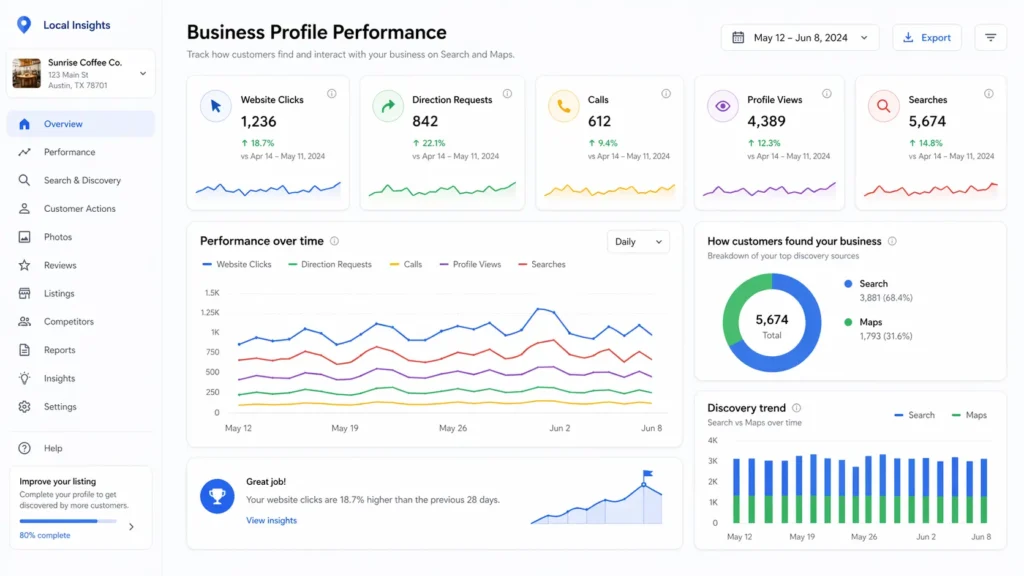
Your Business Profile performance data shows how people interact with your profile on Search and Maps, including views, clicks, and customer actions. You can review these metrics directly in Google Business Profile performance data, which helps you see how customers find your listing and what actions they take before visiting your website.
GA4 then helps you understand what those visitors do after they land on your website.
That means your map listing may tell you that people clicked your website, called your business, asked for directions, or found you through discovery searches. But it will not fully explain whether those website visitors stayed, explored your pages, filled out a form, or bounced. For that, you need analytics on the site itself.
Search Console adds another useful layer because it shows how your site performs in Google Search results, including clicks, impressions, and the queries that triggered visibility. It is helpful, but it is not a full map-traffic tracker on its own.
How to see local website traffic the right way
The simplest workflow is this: check your Business Profile first, then validate behavior in GA4.
In Google Business Profile, open your performance section and review website clicks, searches, calls, and direction requests over a useful date range. This tells you whether your listing is creating interest. In GA4, go to acquisition and landing page reports so you can see where sessions are coming from and which pages receive the traffic. For a clearer breakdown of channels and session sources, use the GA4 traffic acquisition report, which helps connect local discovery activity to landing page engagement and conversions.
Google’s official help documentation confirms that Business Profile owners can review views and clicks in profile performance, while GA4 traffic acquisition is designed to show where website visitors come from.
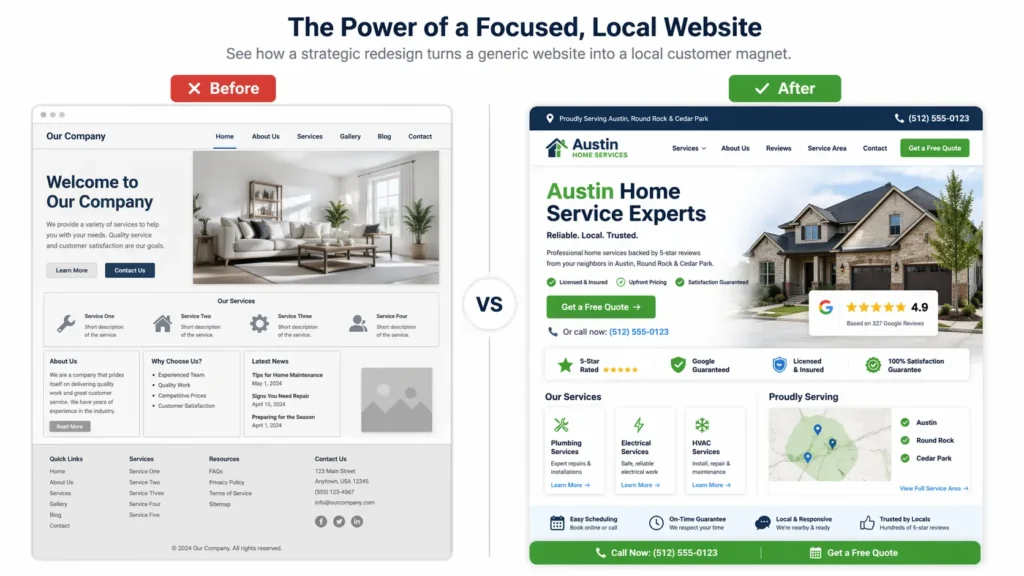
This matters because a click from your listing is not the same as a quality website visit. If your traffic lands on the homepage and leaves fast, the problem may not be Maps visibility at all. It may be page speed, offer clarity, weak headings, or missing trust elements. That is why local SEO and conversion-focused web design should always be reviewed together.
Which tool is best for which question?
Here is the easiest way to think about it.
| Question you want answered | Best tool to use | What it tells you |
|---|---|---|
| Are people finding my business in Maps and clicking my site? | Google Business Profile | Visibility, website clicks, direction requests, calls |
| What happened after they visited my website? | GA4 | Engagement, landing pages, conversions, session quality |
| Which Google searches bring users to my site? | Search Console | Queries, clicks, impressions, page performance |
| Which local page needs improvement first? | GA4 + Search Console | Low engagement pages, weak CTR pages, pages with ranking potential |
For most small businesses, the best option is not one tool. It is a combination. Business Profile gives the top-of-funnel map signal. GA4 gives the on-site behavior. Search Console gives the search query layer. If you only use one, you will always miss part of the story.
That is also why local businesses often overestimate or underestimate performance. A profile may look active, but the site may convert poorly. Or the site may be strong, but the profile may lack enough trust signals to earn clicks in the first place.
How to improve the quality of traffic from your listing
Getting more clicks is only useful if those clicks are relevant. The goal is qualified local traffic, not just more sessions in a report.
Start with business information accuracy. Your primary category, service list, business description, service areas, phone number, website URL, and hours all need to match reality. Inaccurate or incomplete data creates friction. Google also states that complete and up-to-date business information helps local visibility and helps customers understand what you do, where you are, and when they can visit.
Next, improve the page your listing sends visitors to. This is where many businesses lose momentum. If your Business Profile links to a generic homepage, but the searcher wanted one specific service, your website may be forcing them to hunt for answers. A stronger setup often links users to the most relevant service or location page, where pricing guidance, service coverage, FAQs, reviews, and next-step buttons are immediately visible.
A good supporting read here is website optimization for small business, especially if your site already gets visitors but underperforms.
The website elements that convert map visitors better
A local visitor is usually scanning for proof. They do not want fluff. They want confidence.
Your landing page should quickly answer these questions:
✅ What do you offer?
✅ Who do you help?
✅ Where do you serve?
✅ Why should they trust you?
✅ What should they do next?
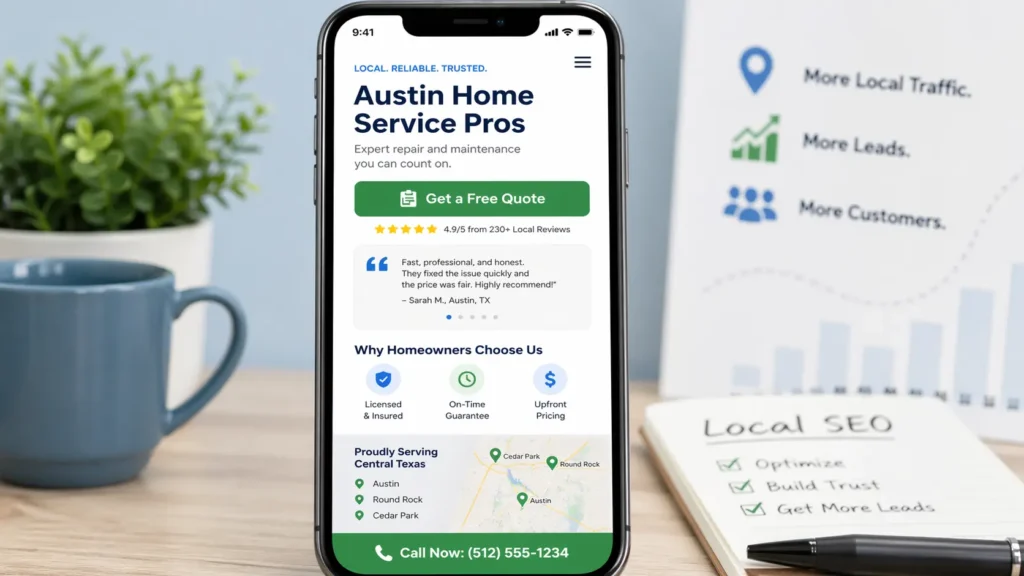
This is why the most effective pages for local traffic often include a location-aware headline, visible phone or inquiry buttons, short trust-building copy, review snippets, service proof, and a clean layout. Fast loading time also matters because map visitors are often on mobile devices and deciding quickly.
This is one area where strong SEO and strong design overlap. Better rankings help you win the click. A better structure helps you keep it. If you are also improving discoverability beyond Maps, this related guide on how to get found on google small business fits naturally into the same strategy.
Common reasons businesses fail to turn Maps visibility into site traffic
The first problem is weak differentiation. If your listing and website look generic, users will keep comparing. They may click, but they will not stay.
The second problem is misaligned intent. For example, a user searches for emergency services, but your linked page talks broadly about the company instead of answering the urgent need. The closer your landing page matches the likely search intent, the better your engagement will be.
The third problem is poor credibility signals. Missing reviews, no service details, outdated photos, vague headlines, and a weak About section all reduce confidence. In local SEO, trust is not decorative. It is functional.
The fourth problem is measurement confusion. Some businesses only look at website sessions and miss the fact that their listing is underperforming. Others only look at listing views and miss the fact that the site experience is what is killing conversions. You need both sides.
What a strong local traffic workflow looks like
A simple weekly process can reveal a lot.
First, review profile performance. Are website clicks improving or declining? Are direction requests rising? Are people finding you through branded searches only, or are discovery searches growing too?
Second, review your website behavior in GA4. Which landing pages attract local visitors? Which ones have strong engagement? Which ones lose people quickly?
Third, compare those patterns with your content and page quality. Do your best-performing pages have clearer service explanations, stronger reviews, better photos, or more obvious calls to action? If yes, apply that structure to weaker pages.
Fourth, update your profile and site together. Add new photos, refine services, improve internal links, refresh local copy, and tighten your call-to-action path. Local SEO works best when your profile is not treated as separate from your website.
Best actions to increase website visits from Maps
| Action | Why it works | Best used when |
|---|---|---|
| Refine primary and secondary categories | Helps Google understand what you offer | Your listing ranks for the wrong terms or weak terms |
| Improve service and location pages | Gives users a better post-click experience | You get clicks, but weak engagement |
| Add fresh photos and review responses | Builds trust before the click | Your listing impressions are fine, but clicks are low |
| Use stronger internal linking | Helps users find related services fast | Visitors land but do not explore |
| Tighten mobile CTA placement | Improves conversion from high-intent visitors | Traffic exists, but leads are inconsistent |
| Match the listing URL to the user intent | Reduces friction after the click | The homepage sends too many mixed signals |
This table is where the “which option is best” question becomes practical. If your issue is visibility, profile optimization should come first. If your issue is website behavior, landing page optimization should come first. If both are weak, handle them together because fixing just one side usually creates limited results.
How local content supports this traffic channel
Many businesses think Maps performance is only about the profile. It is not. Your website content still shapes trust, relevance, and conversion.
For example, if someone finds your business on Maps and clicks through, related content can keep them engaged and move them deeper into the site. A strong blog strategy supports this because it helps answer adjacent questions, build relevance around service topics, and strengthen internal linking. That is one reason local SEO content works best when it is tied to service pages, not published in isolation.
The strongest local content usually does three things at once. It answers the immediate question. It supports the related service page. It helps users understand the next step. That is also why your supporting articles should not feel detached from business goals. They should reduce hesitation and move readers closer to action.
A simple way to judge whether your traffic is improving
Do not judge success by one number alone. Use a short scorecard instead.
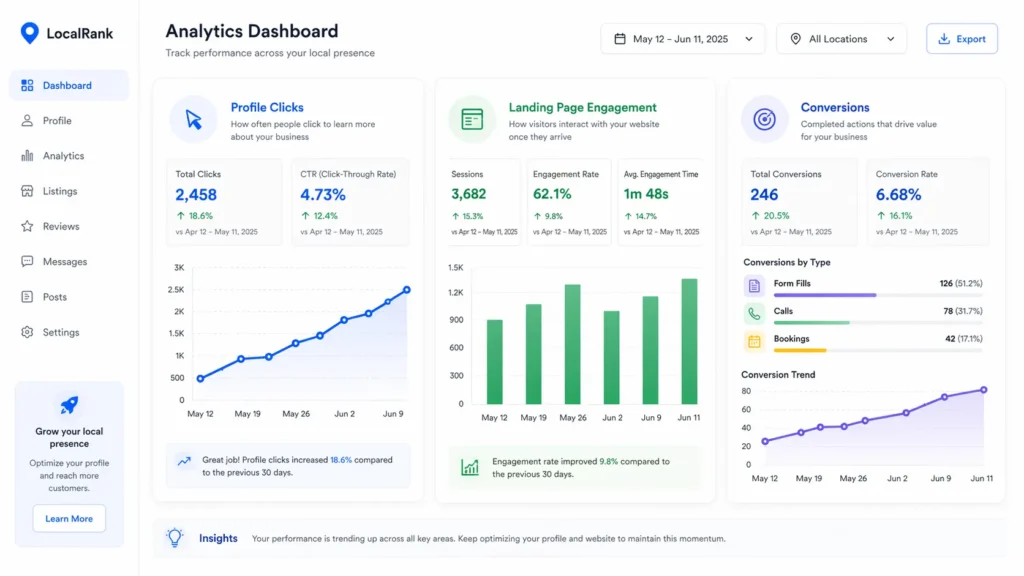
Look at website clicks from your profile. Then compare that with engagement rate, key event completions, form submissions, calls, or booked actions on the linked landing pages. If clicks are up but conversions are flat, your page needs work. If conversions are strong but clicks are low, your profile needs stronger visibility and trust signals.
Also, pay attention to page-level behavior. Sometimes one local page quietly outperforms everything else because it is more specific, easier to scan, and better aligned with intent. That page often becomes your model for improving the rest of the site.
What to Do Next With Google Maps Website Traffic
Google Maps website traffic becomes much more valuable when you stop treating it as a mystery metric and start connecting listing performance with what happens on your site. The businesses that grow from this channel are usually the ones that measure clearly, improve the right page, and remove friction fast.
If you want better results, focus on relevance first, trust second, and conversion clarity third. A complete profile may win the click, but a well-built page is what turns that local interest into real leads, bookings, and revenue. When those two assets work together, you get more than traffic. You get traffic that is ready to act.
Frequently Asked Questions
1. How to see traffic on Google Maps website?
The clearest way to see it is to split the answer between your listing and your site analytics. In Google Business Profile, review performance data to see website clicks, searches, direction requests, and related profile actions. Then open GA4 to understand what those visitors did after they arrived. This two-step method is better than relying on one dashboard because it shows both interest and behavior, which helps you judge whether your map traffic is actually valuable.
2. How do I see website traffic on Google?
The best place to see website traffic on Google is Google Analytics 4, not just Search Console. GA4 shows sessions, landing pages, engagement, conversions, and traffic sources across your website. Search Console is still helpful because it shows Google Search clicks, impressions, and queries, but it does not replace analytics. If you want the full picture, use GA4 for behavior and Search Console for organic search visibility, then compare both regularly.
3. Can I view how much traffic a website gets?
Yes, but the accuracy depends on whether you own the website or you are estimating a competitor. If you own the site, GA4 gives you the most reliable traffic data because it measures actual user sessions and on-site activity. If you are checking another website, third-party SEO tools can estimate traffic trends, but those numbers are directional rather than exact. For decision-making, first-party analytics is always stronger than outside estimates.
4. Does Google pay for website traffic?
No, Google does not pay you simply because people visit your website. Google can send traffic through organic search results, Maps visibility, ads, and business listings, but traffic itself is not a direct payment program. Revenue only happens if that traffic converts into ad clicks on your site, affiliate actions, product sales, service inquiries, or another monetized action. That is why conversion strategy matters just as much as visibility.
