
Homepage copy for small business should tell visitors what you do, who you help, where you serve, and why they should contact you. The best version is clear, local, trust-focused, and built around one action like calling, booking, or requesting a quote.
Your homepage is not just a welcome page. It is your first sales conversation with people who may be comparing you against two or three other businesses.
If the message is confusing, visitors leave. If the copy answers their questions quickly, they stay longer, trust you faster, and take the next step.
What Your Homepage Copy Should Do First
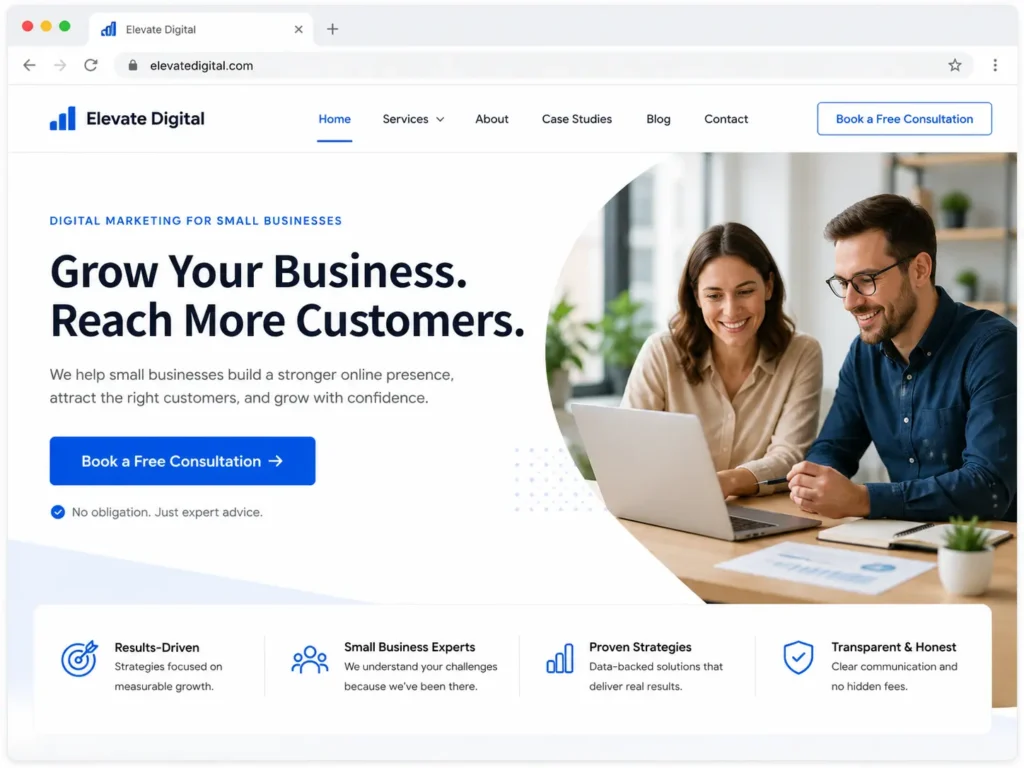
A strong homepage should answer the visitor’s biggest questions before they scroll too far. People want to know if they are in the right place, if you solve their problem, and if they can trust you.
Your first section should explain:
✅ What service you offer
✅ Who you help
✅ What result you create
✅ Where you serve customers
✅ What action visitors should take next
For example, instead of saying “Creative digital solutions for modern brands,” a local contractor website can say:
“We build fast, mobile-friendly websites for home service businesses that need more calls, quote requests, and booked jobs.”
That sentence works because it is specific. It tells the reader who the service is for and what outcome matters.
If your current homepage sounds vague, consider reviewing your structure with website design & development services so the design and message work together.
Why Homepage Copy Matters for Small Businesses
Small business owners often think design is the only thing that makes a website successful. Design matters, but copy tells visitors what to believe and what to do next.
Good homepage copy helps with:
✅ Trust: People understand who you are and why you are credible
✅ SEO: Search engines can understand your services and location
✅ Conversions: Visitors know how to call, book, or request a quote
✅ Clarity: Your business sounds professional instead of generic
Google’s SEO Starter Guide explains that SEO improvements help search engines crawl, index, and understand pages better.
That is why your homepage should not be filled with clever lines that only sound nice. It should include real service terms, customer pain points, trust details, and clear calls to action.
Homepage Copy Elements That Bring Better Results
| Homepage Section | What It Should Answer | Simple Example |
|---|---|---|
| Hero headline | What do you do? | Websites that help local service businesses get more leads |
| Subheadline | Who do you help and why? | Built for contractors, clinics, consultants, and growing local brands |
| Call to action | What should visitors do next? | Book a free website review |
| Service overview | What can they hire you for? | Website design, redesigns, landing pages, SEO support |
| Trust section | Why should they believe you? | Portfolio, reviews, local experience, process |
| FAQ section | What objections do they have? | Cost, timeline, SEO, redesign questions |
This structure works because it follows how real buyers think. They do not want to search your site for basic answers. They want fast proof that you can help them.
How to Write a Strong Homepage Hero Section
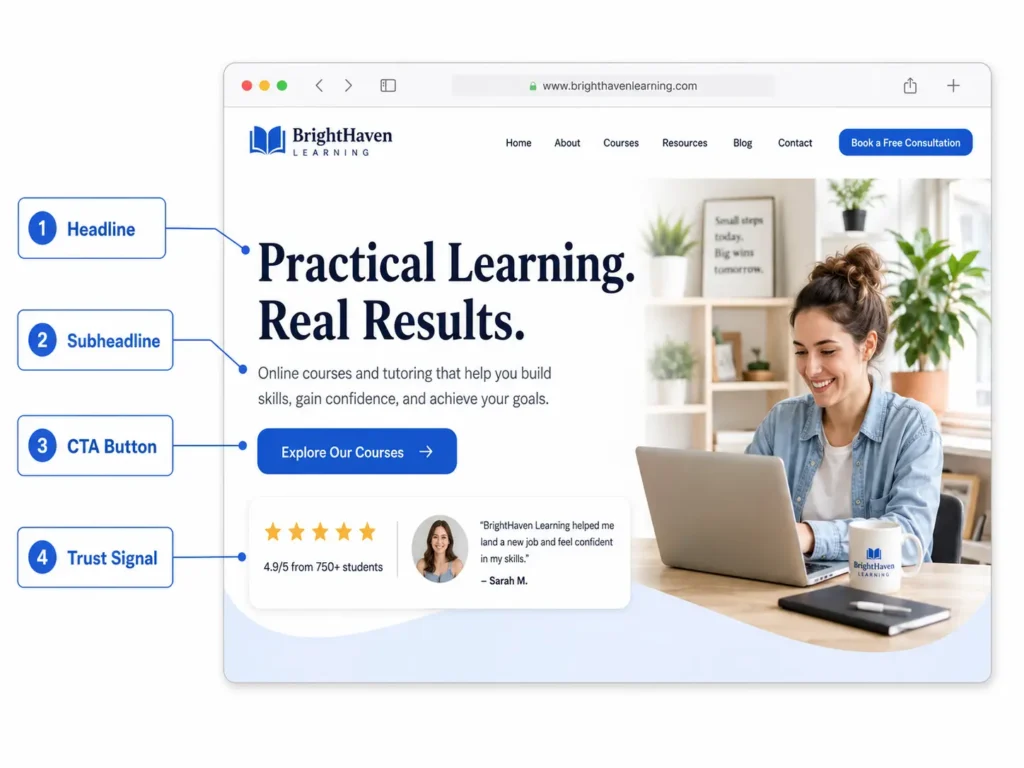
Your hero section is the first visible area of the homepage. It usually includes the headline, short description, main button, and sometimes a supporting image.
A good hero section should be simple enough to understand in a few seconds.
Hero headline formula
Use this structure:
Service + audience + result
Examples:
✅ Custom websites for local businesses that need more booked calls
✅ Website redesigns for service brands that want better leads
✅ Landing pages built to turn ad clicks into appointments
Your headline does not need to be fancy. It needs to be useful.
Subheadline formula
Use this structure:
What you do + how it helps + why it matters
Example:
“We design fast, mobile-friendly websites that make your business easier to trust, easier to find, and easier to contact.”
This gives the visitor a reason to keep reading.
Call-to-action button
Your button should match the visitor’s intent. If people are ready to talk, use “Book a Call.” If they need help understanding what is wrong with their site, use “Get a Free Website Audit.”
For a small business website, one strong CTA is usually better than several competing buttons.
What to Include Above the Fold
The top of your homepage should not feel empty. It should provide enough information for a visitor to decide whether to continue.
Include:
✅ A clear headline
✅ A short supporting sentence
✅ One main CTA
✅ A trust signal
✅ A visual that matches your service
A trust signal can be a review snippet, years in business, service area, number of completed projects, or a line like “Helping U.S. small businesses build faster, cleaner, lead-focused websites.”
If you want more examples of how this applies to local brands, read this guide on website designer for U.S. small businesses.
How to Build Trust Through Homepage Copy
Trust is one of the biggest reasons visitors become leads. If your homepage looks nice but gives no proof, people may hesitate.
Nielsen Norman Group’s guide on trustworthiness in web design highlights design quality, upfront information, current content, and connection to the wider web as important credibility factors.
For a small business homepage, trust can come from:
✅ Real project screenshots
✅ Before-and-after redesign examples
✅ Testimonials with names or business types
✅ Clear pricing direction or service expectations
✅ Local service area details
✅ A simple explanation of your process
Do not hide important information. If people have to guess what you do, where you work, or how to contact you, they may choose another provider.
You can also link to portfolio highlights near your trust section so visitors can see real work without leaving the decision path.
Which Homepage Copy Option Is Best?
Not every business needs the same approach. The best option depends on your offer, audience, and how much trust your visitor needs before contacting you.
| Business Type | Best Homepage Copy Focus | Best CTA |
|---|---|---|
| Local service business | Service, location, trust, fast contact | Call Now or Request a Quote |
| Consultant or coach | Expertise, results, process, authority | Book a Consultation |
| Medical or wellness office | Trust, care, services, booking details | Schedule an Appointment |
| Contractor or trade business | Proof, service area, reviews, project photos | Get a Free Estimate |
| Ecommerce support service | Benefits, process, speed, case studies | Start Your Project |
| New business | Clear offer, local relevance, founder credibility | Contact Us |
For most small businesses, the best option is a service-focused homepage with local trust signals and one primary call to action. This is better than a broad “about us” homepage because visitors usually arrive with a problem they want solved.
If your website is outdated, slow, or not bringing enough leads, a website redesign that converts may be more useful than editing copy alone.
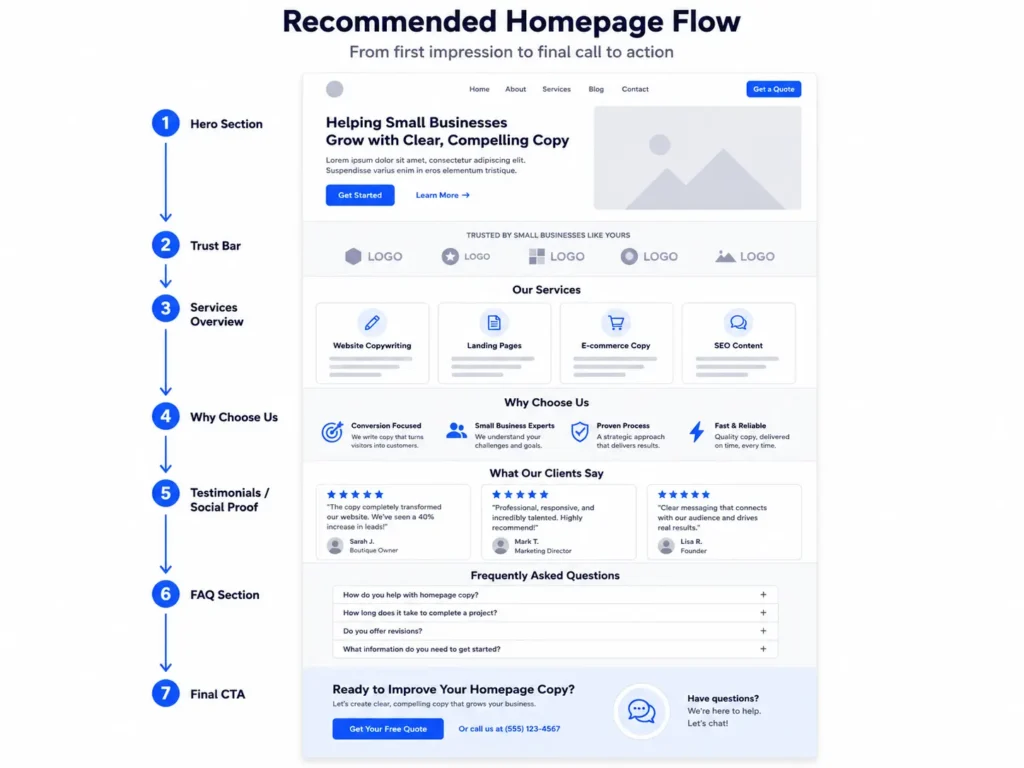
Homepage Sections That Should Not Be Missing
Your homepage does not need to be complicated, but it should feel complete. A simple structure often converts better than a long page full of random sections.
1. Clear opening promise
Tell people exactly what you help them achieve. Avoid generic lines like “We help brands grow.” Say what you do in plain language.
2. Services preview
Show your main services with short descriptions. For Salt Web Designer, this could include website design, redesigns, landing pages, SEO structure, speed improvements, and ongoing care.
3. Who you help
Name the audience. Small business owners want to know if you understand their type of business.
4. Why choose you
Explain what makes your work different. This can include conversion strategy, clean design, SEO foundations, fast-loading pages, or a clear project process.
5. Proof section
Add screenshots, case studies, reviews, or a portfolio link. Proof lowers hesitation.
6. Strong final CTA
End the homepage with a clear next step. Do not let the page fade out without inviting action.
For more planning help, use this website content checklist for small business before writing or redesigning your homepage.
How to Make Your Copy Work for SEO and Leads
SEO copy should sound natural, but it also needs structure. Search engines and visitors both need clear signals.
Use your main service terms in important places like:
✅ Page title
✅ First paragraph
✅ Main headings
✅ Service descriptions
✅ Image alt text
✅ FAQ questions
✅ Meta description
Do not repeat the same phrase too many times. Instead, use related terms such as small business website copy, homepage messaging, website redesign, landing page copy, local SEO, and conversion-focused web design.
The goal is to help Google understand the topic while still making the page helpful for real people.
If you need support improving the full page message, this website copywriting guide for small businesses can help you organize your ideas before you update the design.
Practical Tips for Writing Better Homepage Copy
Here are simple ways to make the page stronger without overcomplicating it.
✅ Write for one ideal customer first. A homepage that tries to speak to everyone usually feels weak.
✅ Replace vague claims with proof. Instead of “high quality service,” say what makes the experience better.
✅ Keep paragraphs short. Most visitors scan before they read.
✅ Use action-based buttons. “Get Started” is fine, but “Book a Free Website Review” is clearer.
✅ Put contact options where people expect them. Add the phone number, contact button, and booking link in obvious places.
✅ Match copy with design. A strong message can lose impact if the page is hard to read, slow, or cluttered.
Common Homepage Copy Mistakes to Avoid
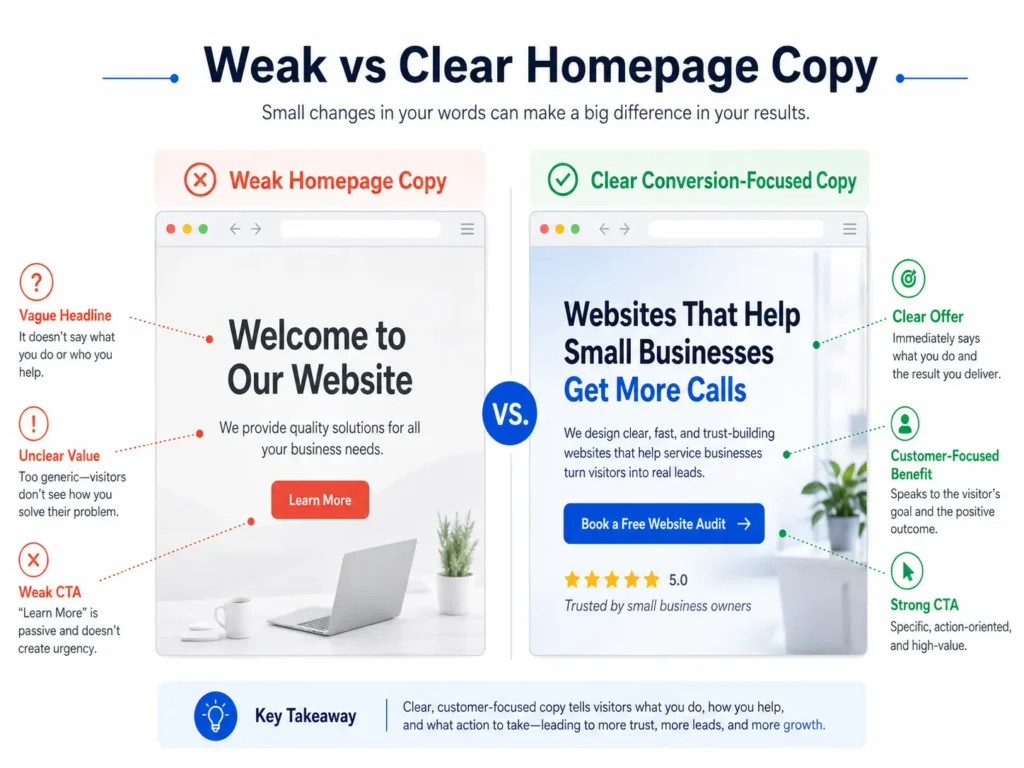
Many small business websites lose leads because the homepage creates confusion. The visitor may like the business, but they do not know what to do next.
Avoid these common mistakes:
✅ Starting with “Welcome to our website” instead of a useful headline
✅ Talking too much about the business before explaining the customer benefit
✅ Using industry jargon that normal buyers do not understand
✅ Hiding the service area
✅ Having no testimonials or project examples
✅ Adding too many buttons with different goals
✅ Making visitors scroll too far before seeing how to contact you
A homepage should guide people. Every section should move them closer to trust, clarity, and action.
Where Landing Pages and Redesigns Fit In
Your homepage is the main overview of your business, but it should not do every job alone.
Landing pages are better for specific campaigns. If you run ads for “website redesign for contractors,” the landing page should focus only on that offer. It should not distract visitors with every service your business provides.
A redesign is helpful when the problem is bigger than words. If the website is slow, hard to use, outdated, or not mobile-friendly, better copy may not be enough. The page structure, layout, and user experience may need to be rebuilt.
That is where growth-driven web design can help. The goal is not just to make the site look better. The goal is to turn more visitors into real inquiries.
Simple Homepage Copy Example
Here is a basic example for a small service business:
Headline: Websites that help local businesses get more calls and booked jobs
Subheadline: We design clean, fast, and mobile-friendly websites for service-based businesses that want to look professional, rank better, and make it easier for customers to take action.
CTA: Book a Free Website Review
Trust line: Trusted by small businesses that need clear messaging, modern design, and stronger online visibility.
Service preview: Website design, website redesigns, landing pages, SEO setup, speed improvements, and ongoing website care.
This example works because it connects the service to the outcome. It also avoids overexplaining too early.
Final Thoughts: homepage copy for small business
The right homepage message can make your business easier to understand, trust, and contact. It should quickly explain your value, show proof, and guide visitors toward one clear next step.
If your homepage is not bringing calls, bookings, or quote requests, the problem may not be traffic. It may be the message, layout, or trust signals.
Start by rewriting the top section, adding stronger proof, and making your CTA more specific. Then review the full page to see if every section helps visitors decide with confidence.
Frequently Asked Questions
1. What should a small business homepage say?
A small business homepage should clearly explain what you do, who you help, and how visitors can take action. The top section should include your main service, location or audience, a clear benefit, and one strong call-to-action. After that, add services, trust signals, reviews, project examples, and answers to common questions. The goal is to remove confusion so visitors can quickly decide whether to call, book, or request a quote.
2. How can homepage copy help my website get more leads?
Homepage copy can help generate more leads by making your offer easier to understand and your business easier to trust. Strong copy explains the customer problem, your solution, and the next step in plain language. It also supports SEO by using service-related terms naturally. When visitors see clear benefits, proof, and a simple contact path, they are more likely to call, schedule, or submit a form.
3. Should I hire a web designer to rewrite my homepage?
You should consider hiring a web designer if your homepage looks outdated, loads slowly, lacks clear messaging, or does not convert visitors into leads. A professional can improve the copy, layout, mobile experience, trust sections, and call-to-action flow together. This matters because copy and design work best as one system. If the words are strong but the page is confusing, visitors may still leave before contacting you.
4. What is the best call-to-action for a small business website?
The best call-to-action depends on your sales process, but it should be specific, easy to understand, and connected to buyer intent. Service businesses often do well with “Request a Quote,” “Book a Free Consultation,” or “Schedule an Appointment.” If visitors need guidance before buying, “Get a Free Website Audit” or “Start Your Project” can work better. Avoid using too many different CTAs because that can split attention and reduce conversions.
